Fine-Tuning
Fine-tuning is the process of modifying the weights of a Large Language Model to help it perform better on a specific task or set of tasks.
In this section, we'll cover the options Ludwig offers for fine-tuning, and provide guidance on when to use which techniques depending on your task.
Generative vs Predictive Fine-Tuning
Ludwig offers fine-tuning capabilities for both generative and predictive tasks. Generative tasks are supported via the llm model type,
while predictive tasks are supported through the ecd model type when using a large language model as a pretrained text encoder.
For generative tasks like chatbots and code generation, fine-tuning both the language model’s encoder (which produces embeddings) and its decoder (which produces next token probabilities) is the straightforward and preferred approach. This is supported neatly in Ludwig by the previously shown example config above.
For predictive tasks, the temptation is often to take an existing text generation model and fine-tune it to generate text that matches a specific category in a multi-class classification problem, or a specific number for a regression problem. However, the result is a model that comes with a couple of drawbacks:
- Text generation models are slow to make predictions. Particularly auto-regressive models (of which Llama and most popular LLMs are considered) require generating text one token at a time, which is many times slower than generating a single output.
- Text generation models can hallucinate. This can be mitigated by using conditional decoding strategies, but if you only want a model that can output one of N distinct outputs, having a model that can output anything is overkill.
For such predictive (classification, regression) tasks, the solution is to remove the language model head / decoder at the end of the LLM, and replace it with a task-specific head / decoder (usually a simple multi-layer perceptron). The task-specific head at the end can then be quickly trained on the task-specific dataset, while the pretrained LLM encoder is either minimally adjusted (with parameter efficient fine-tuning) or held constant. When holding the LLM weights constant (also known as “linear probing”), the training process can further benefit from Ludwig optimizations like cached encoder embeddings for up to a 50x speedup.
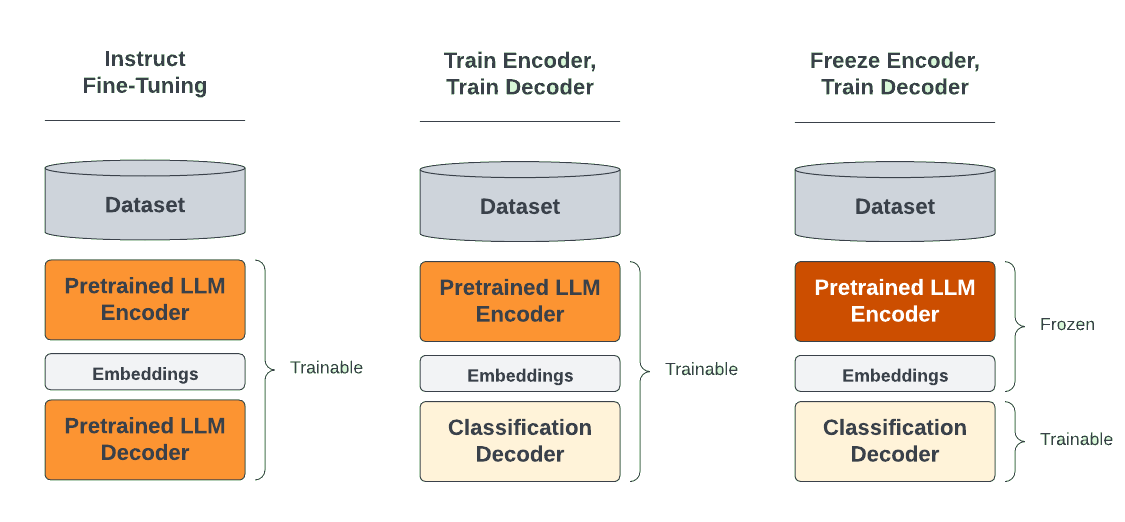
You can find an example of generative fine-tuning here.
You can find an example of predictive fine-tuning here.
For full details on configuring LLM fine-tuning, see the Configuration docs.
Preference Learning / Alignment Fine-Tuning
Beyond standard supervised fine-tuning, Ludwig supports preference learning trainers that align models with human preferences using ranked feedback data (a "chosen" response vs a "rejected" response for the same prompt).
These trainers are useful after an initial SFT stage to improve response quality, reduce harmful outputs, and make models follow instructions more reliably.
Available alignment trainers
| Trainer | Description |
|---|---|
dpo |
Direct Preference Optimization — directly optimises the policy from preference pairs without a reward model |
kto |
Kahneman-Tversky Optimization — works with single-label feedback (good / bad) instead of pairs |
orpo |
Odds Ratio Preference Optimization — combines SFT and alignment into a single-stage objective |
grpo |
Group Relative Policy Optimization — reinforcement learning style trainer using group-normalised rewards |
Example: DPO alignment
Your dataset needs prompt, chosen, and rejected columns:
| prompt | chosen | rejected |
|---|---|---|
| Explain gravity | Gravity is a force that attracts objects... | IDK lol |
| Write a poem | Roses are red... | Error 404 |
model_type: llm
base_model: meta-llama/Llama-3.1-8B

adapter:
  type: lora

trainer:
  type: dpo
  epochs: 1
  learning_rate: 5.0e-7
  beta: 0.1  # KL penalty coefficient

input_features:
  - name: prompt
    type: text

output_features:
  - name: chosen
    type: text
Example: KTO alignment
KTO requires only a single response column plus a boolean label indicating whether it is desirable:
trainer:
  type: kto
  epochs: 1
  learning_rate: 5.0e-7
  desirable_weight: 1.0
  undesirable_weight: 1.0
Uploading to HuggingFace Hub
After fine-tuning an LLM, the output will be updated model weights which can be uploaded directly to HuggingFace and deployed to an endpoint or shared with other users even outside of Ludwig.
ludwig upload hf_hub -r <your_org>/<model_name> -m <path/to/model>
from ludwig.api import LudwigModel

LudwigModel.upload_to_hf_hub("your_org/model_name", "path/to/model")