⇅ Image Features
Input image features are transformed into a float valued tensors of size N x C x H x W (where N is the size of the
dataset, C is the number of channels, and H x W is the height and width of the image (can be specified by the user).
These tensors are added to HDF5 with a key that reflects the name of column in the dataset.
The column name is added to the JSON file, with an associated dictionary containing preprocessing information about the sizes of the resizing.
Supported Image Formats
The number of channels in the image is determined by the image format. The following table lists the supported image formats and the number of channels.
| Format | Number of channels |
|---|---|
| Grayscale | 1 |
| Grayscale with Alpha | 2 |
| RGB | 3 |
| RGB with Alpha | 4 |
Preprocessing
During preprocessing, raw image files are transformed into numpy arrays and saved in the hdf5 format.
Note
Images passed to an image encoder are expected to have the same size. If images are different sizes, by default they
will be resized to the dimensions of the first image in the dataset. Optionally, a resize_method together with a
target width and height can be specified in the feature preprocessing parameters, in which case all images will
be resized to the specified target size.
preprocessing:
    missing_value_strategy: bfill
    fill_value: null
    height: null
    width: null
    num_channels: null
    num_processes: 1
    num_classes: null
    resize_method: interpolate
    infer_image_num_channels: true
    infer_image_dimensions: true
    infer_image_max_height: 256
    infer_image_max_width: 256
    infer_image_sample_size: 100
    standardize_image: null
    in_memory: true
    requires_equal_dimensions: false
    infer_image_num_classes: false
    mode: lazy
    prefetch_size: null
    lazy_cache_dir: null
Parameters:
missing_value_strategy(default:bfill) : What strategy to follow when there's a missing value in an image column Options:fill_with_const,fill_with_mode,bfill,ffill,drop_row.fill_value(default:null): The maximum number of most common tokens to be considered. If the data contains more than this amount, the most infrequent tokens will be treated as unknown.height(default:null): The image height in pixels. If this parameter is set, images will be resized to the specified height using the resize_method parameter. If None, images will be resized to the size of the first image in the dataset.width(default:null): The image width in pixels. If this parameter is set, images will be resized to the specified width using the resize_method parameter. If None, images will be resized to the size of the first image in the dataset.num_channels(default:null): Number of channels in the images. If specified, images will be read in the mode specified by the number of channels. If not specified, the number of channels will be inferred from the image format of the first valid image in the dataset.num_processes(default:1): Specifies the number of processes to run for preprocessing images.num_classes(default:null): Number of channel classes in the images. If specified, this value will be validated against the inferred number of classes. Use 2 to convert grayscale images to binary images.resize_method(default:interpolate): The method to use for resizing images. Options:crop_or_pad,interpolate.infer_image_num_channels(default:true): If true, then the number of channels in the dataset is inferred from a sample of the first image in the dataset.infer_image_dimensions(default:true): If true, then the height and width of images in the dataset will be inferred from a sample of the first image in the dataset. Each image that doesn't conform to these dimensions will be resized according to resize_method. If set to false, then the height and width of images in the dataset will be specified by the user.infer_image_max_height(default:256): If infer_image_dimensions is set, this is used as the maximum height of the images in the dataset.infer_image_max_width(default:256): If infer_image_dimensions is set, this is used as the maximum width of the images in the dataset.infer_image_sample_size(default:100): The sample size used for inferring dimensions of images in infer_image_dimensions.standardize_image(default:null): Standardize image by per channel mean centering and standard deviation scaling . Options:imagenet1k,null.in_memory(default:true): Defines whether image dataset will reside in memory during the training process or will be dynamically fetched from disk (useful for large datasets). In the latter case a training batch of input images will be fetched from disk each training iteration.requires_equal_dimensions(default:false): If true, then width and height must be equal.-
infer_image_num_classes(default:false): If true, then the number of channel classes in the dataset will be inferred from a sample of the first image in the dataset. Each unique channel value will be mapped to a class and preprocessing will create a masked image based on the channel classes. -
mode(default:lazy): Preprocessing mode for image features. 'eager' decodes all files during preprocessing and stores tensors in the Parquet cache. 'lazy' stores file paths and decodes per batch during training, keeping peak memory bounded to batch_size × image_size. 'lazy_cached' behaves like 'lazy' on the first training epoch but writes decoded tensors to a numpy memmap alongside the Parquet cache; subsequent epochs read from the memmap directly, eliminating decode overhead. Lazy mode is disabled automatically when a torchvision pretrained encoder is used. Options:eager,lazy,lazy_cached. prefetch_size(default:null): Number of batches to prefetch in a background thread while the GPU processes the current batch. None (default) selects automatically: 0 for 'eager' mode, 4 for 'lazy' and 'lazy_cached' (epoch 1). After the first epoch in 'lazy_cached' mode, prefetch is automatically disabled since memmap reads are fast enough. Set to 0 to disable prefetch entirely, or to a positive integer to override the automatic selection.lazy_cache_dir(default:null): Directory in which to cache image files when the source data is in-memory (e.g. a HuggingFace dataset). Only used when mode is 'lazy' or 'lazy_cached' and the input entries are not already paths to existing files. When None, defaults to ~/.cache/ludwig/lazy_media//. Has no effect when the input column already contains local file paths.
Preprocessing parameters can also be defined once and applied to all image input features using the Type-Global Preprocessing section.
Preprocessing Modes
Ludwig supports three preprocessing modes for image features, controlled by the mode parameter:
| Mode | Preprocessing memory | Training epoch 1 | Training epoch 2+ | Best for |
|---|---|---|---|---|
eager |
High (O(N×tensor)) | Fast | Fast | Small datasets that fit in RAM |
lazy (default) |
Low (O(batch)) | Slower (decode-bound) | Slower | Large datasets |
lazy_cached |
Low (O(batch)) | Fast (GPU pipelined) | Very fast (memmap) | Large datasets, any GPU speed |
mode: lazy (default)
Ludwig stores file paths in the processed dataset and decodes images on-the-fly, one batch at a
time, during training. Decoding runs in a ThreadPoolExecutor that overlaps with the GPU forward
pass, matching the throughput of the eager decode path.
mode: lazy_cached
On the first training epoch, images are decoded per batch (same as lazy) and written to a numpy
memmap alongside the Parquet cache. From epoch 2 onward, the memmap is read directly
(~0.1 ms/batch), eliminating decode overhead entirely.
mode: eager
All images are decoded during preprocessing and stored as tensors in the Parquet cache. Use this only when the full decoded dataset fits comfortably in memory.
Configuration Examples
input_features:
  - name: image
    type: image
    preprocessing:
      mode: lazy              # default
      prefetch_size: null     # auto (4 for lazy/lazy_cached, 0 for eager)
      lazy_cache_dir: null    # default: ~/.cache/ludwig/lazy_media/<feature_name>/
      height: 224
      width: 224
      num_channels: 3
      resize_method: interpolate
input_features:
  - name: image
    type: image
    preprocessing:
      mode: lazy_cached       # decode+cache on epoch 1; memmap from epoch 2+
      lazy_cache_dir: /fast/nvme/image_cache
input_features:
  - name: image
    type: image
    preprocessing:
      mode: eager             # decode everything upfront
Note
Lazy preprocessing is automatically disabled when using a TorchVision pretrained encoder
(e.g. resnet, efficientnet, vit). Those encoders apply their own normalization pipeline
which requires images to be decoded upfront.
See Choosing a Preprocessing Mode for a full comparison.
Lazy Preprocessing with HuggingFace Datasets
When loading a HuggingFace dataset, image columns are delivered as PIL.Image.Image objects — not
file paths. Ludwig handles this transparently based on what the PIL Image carries:
- PIL Image opened from disk — PIL sets a
.filenameattribute pointing to the source file. Ludwig detects this and reuses that path directly (no copy). - In-memory PIL Image (no
.filename) — Ludwig saves the image as a PNG file inlazy_cache_dirand uses that path going forward.
HuggingFace may also deliver images as dicts:
{"bytes": b"...", "path": "/path/to/cached.jpg"} # HF Image column format
Ludwig will reuse "path" if the file exists, otherwise decode "bytes" and save to cache.
Raw bytes and numpy.ndarray inputs (both HWC and CHW channel orderings) are also supported.
The cache is persistent and idempotent: subsequent runs with the same dataset skip the write step entirely.
Controlling the Cache Directory
lazy_cache_dir controls where PNG files are written for in-memory sources (HuggingFace datasets).
The decoded memmap for lazy_cached mode is placed next to the Parquet cache, not inside
lazy_cache_dir.
input_features:
  - name: photo
    type: image
    preprocessing:
      mode: lazy_cached
      lazy_cache_dir: /fast/nvme/my_project/image_cache
The per-feature subdirectory is created automatically. Multiple image features each get their own
subdirectory named after the feature, even if they share the same lazy_cache_dir.
Input Features
The encoder parameters specified at the feature level are:
tied(defaultnull): name of another input feature to tie the weights of the encoder with. It needs to be the name of a feature of the same type and with the same encoder parameters.augmentation(defaultFalse): specifies image data augmentation operations to generate synthetic training data. More details on image augmentation can be found here.
Example image feature entry in the input features list:
name: image_column_name
type: image
tied: null
encoder:
    type: stacked_cnn
The available encoder parameters are:
type(defaultstacked_cnn): the possible values arestacked_cnn,resnet,mlp_mixer,vit,clip,dinov2,siglip,convnextv2, and TorchVision Pretrained Image Classification models.
Encoder type and encoder parameters can also be defined once and applied to all image input features using the Type-Global Encoder section.
Encoders
Convolutional Stack Encoder (stacked_cnn)
Stack of 2D convolutional layers with optional normalization, dropout, and down-sampling pooling layers, followed by an optional stack of fully connected layers.
Convolutional Stack Encoder takes the following optional parameters:
encoder:
    type: stacked_cnn
    conv_dropout: 0.0
    output_size: 128
    num_conv_layers: null
    out_channels: 32
    conv_norm: null
    fc_norm: null
    fc_norm_params: null
    conv_activation: relu
    kernel_size: 3
    stride: 1
    padding_mode: zeros
    padding: valid
    dilation: 1
    groups: 1
    pool_function: max
    pool_kernel_size: 2
    pool_stride: null
    pool_padding: 0
    pool_dilation: 1
    conv_norm_params: null
    conv_layers: null
    fc_dropout: 0.0
    fc_activation: relu
    fc_use_bias: true
    fc_bias_initializer: zeros
    fc_weights_initializer: xavier_uniform
    num_fc_layers: 1
    fc_layers: null
    skip: false
    adapter: null
    num_channels: null
    conv_use_bias: true
Parameters:
conv_dropout(default:0.0) : Dropout rateoutput_size(default:128) : If output_size is not already specified in fc_layers this is the default output_size that will be used for each layer. It indicates the size of the output of a fully connected layer.num_conv_layers(default:null) : Number of convolutional layers to use in the encoder.out_channels(default:32): Indicates the number of filters, and by consequence the output channels of the 2d convolution. If out_channels is not already specified in conv_layers this is the default out_channels that will be used for each layer.conv_norm(default:null): If a norm is not already specified in conv_layers this is the default norm that will be used for each layer. It indicates the normalization applied to the activations and can be null, batch or layer. Options:batch,layer,null.fc_norm(default:null): If a norm is not already specified in fc_layers this is the default norm that will be used for each layer. It indicates the norm of the output and can be null, batch or layer. Options:batch,layer,null.fc_norm_params(default:null): Parameters used if norm is either batch or layer. For information on parameters used with batch see Torch's documentation on batch normalization or for layer see Torch's documentation on layer normalization.conv_activation(default:relu): If an activation is not already specified in conv_layers this is the default activation that will be used for each layer. It indicates the activation function applied to the output. Options:elu,leakyRelu,logSigmoid,relu,sigmoid,tanh,softmax,gelu,silu,swish,mish,selu,prelu,relu6,hardswish,hardsigmoid,softplus,celu,swiglu,geglu,reglu,sparsemax,entmax15,null.kernel_size(default:3): An integer or pair of integers specifying the kernel size. A single integer specifies a square kernel, while a pair of integers specifies the height and width of the kernel in that order (h, w). If a kernel_size is not specified in conv_layers this kernel_size that will be used for each layer.stride(default:1): An integer or pair of integers specifying the stride of the convolution along the height and width. If a stride is not already specified in conv_layers, specifies the default stride of the 2D convolutional kernel that will be used for each layer.padding_mode(default:zeros): If padding_mode is not already specified in conv_layers, specifies the default padding_mode of the 2D convolutional kernel that will be used for each layer. Options:zeros,reflect,replicate,circular.padding(default:valid): An int, pair of ints (h, w), or one of ['valid', 'same'] specifying the padding used forconvolution kernels.dilation(default:1): An int or pair of ints specifying the dilation rate to use for dilated convolution. If dilation is not already specified in conv_layers, specifies the default dilation of the 2D convolutional kernel that will be used for each layer.groups(default:1): Groups controls the connectivity between convolution inputs and outputs. When groups = 1, each output channel depends on every input channel. When groups > 1, input and output channels are divided into groups separate groups, where each output channel depends only on the inputs in its respective input channel group. in_channels and out_channels must both be divisible by groups.pool_function(default:max): Pooling function to use. Options:max,average,avg,mean.pool_kernel_size(default:2): An integer or pair of integers specifying the pooling size. If pool_kernel_size is not specified in conv_layers this is the default value that will be used for each layer.pool_stride(default:null): An integer or pair of integers specifying the pooling stride, which is the factor by which the pooling layer downsamples the feature map. Defaults to pool_kernel_size.pool_padding(default:0): An integer or pair of ints specifying pooling padding (h, w).pool_dilation(default:1): An integer or pair of ints specifying pooling dilation rate (h, w).conv_norm_params(default:null): Parameters used if conv_norm is either batch or layer.conv_layers(default:null): List of convolutional layers to use in the encoder.fc_dropout(default:0.0): Dropout ratefc_activation(default:relu): If an activation is not already specified in fc_layers this is the default activation that will be used for each layer. It indicates the activation function applied to the output. Options:elu,leakyRelu,logSigmoid,relu,sigmoid,tanh,softmax,gelu,silu,swish,mish,selu,prelu,relu6,hardswish,hardsigmoid,softplus,celu,swiglu,geglu,reglu,sparsemax,entmax15,null.fc_use_bias(default:true): Whether the layer uses a bias vector.fc_bias_initializer(default:zeros): Initializer for the bias vector. Options:constant,dirac,eye,identity,kaiming_normal,kaiming_uniform,normal,ones,orthogonal,sparse,uniform,xavier_normal,xavier_uniform,zeros.fc_weights_initializer(default:xavier_uniform): Initializer for the weights matrix. Options:constant,dirac,eye,identity,kaiming_normal,kaiming_uniform,normal,ones,orthogonal,sparse,uniform,xavier_normal,xavier_uniform,zeros.num_fc_layers(default:1): The number of stacked fully connected layers.fc_layers(default:null): A list of dictionaries containing the parameters of all the fully connected layers. The length of the list determines the number of stacked fully connected layers and the content of each dictionary determines the parameters for a specific layer. The available parameters for each layer are: activation, dropout, norm, norm_params, output_size, use_bias, bias_initializer and weights_initializer. If any of those values is missing from the dictionary, the default one specified as a parameter of the encoder will be used instead.skip(default:false):-
adapter(default:null): -
num_channels(default:null): Number of channels to use in the encoder. conv_use_bias(default:true): If bias not already specified in conv_layers, specifies if the 2D convolutional kernel should have a bias term.
MLP-Mixer Encoder
Encodes images using MLP-Mixer, as described in MLP-Mixer: An all-MLP Architecture for Vision. MLP-Mixer divides the image into equal-sized patches, applying fully connected layers to each patch to compute per-patch representations (tokens) and combining the representations with fully-connected mixer layers.
The MLP-Mixer Encoder takes the following optional parameters:
encoder:
    type: mlp_mixer
    dropout: 0.0
    num_layers: 8
    patch_size: 16
    skip: false
    adapter: null
    num_channels: null
    embed_size: 512
    token_size: 2048
    channel_dim: 256
    avg_pool: true
Parameters:
dropout(default:0.0) : Dropout rate.num_layers(default:8) : The depth of the network (the number of Mixer blocks).patch_size(default:16): The image patch size. Each patch is patch_size² pixels. Must evenly divide the image width and height.skip(default:false):-
adapter(default:null): -
num_channels(default:null): Number of channels to use in the encoder. embed_size(default:512): The patch embedding size, the output size of the mixer if avg_pool is true.token_size(default:2048): The per-patch embedding size.channel_dim(default:256): Number of channels in hidden layer.avg_pool(default:true): If true, pools output over patch dimension, outputs a vector of shape (embed_size). If false, the output tensor is of shape (n_patches, embed_size), where n_patches is img_height x img_width / patch_size².
TorchVision Pretrained Model Encoders
Twenty TorchVision pretrained image classification models are available as Ludwig image encoders. The available models are:
AlexNetConvNeXtDenseNetEfficientNetEfficientNetV2GoogLeNetInception V3MaxVitMNASNetMobileNet V2MobileNet V3RegNetResNetResNeXtShuffleNet V2SqueezeNetSwinTransformerVGGVisionTransformerWide ResNet
See TorchVison documentation for more details.
Ludwig encoders parameters for TorchVision pretrained models:
AlexNet
encoder:
    type: alexnet
    skip: false
    adapter: null
    use_pretrained: true
    model_cache_dir: null
    saved_weights_in_checkpoint: false
    trainable: true
    model_variant: base
Parameters:
skip(default:false):adapter(default:null):use_pretrained(default:true):model_cache_dir(default:null):saved_weights_in_checkpoint(default:false):trainable(default:true):model_variant(default:base): Pretrained model variant to use. Options:base.
ConvNeXt
encoder:
    type: convnext
    skip: false
    adapter: null
    use_pretrained: true
    model_cache_dir: null
    saved_weights_in_checkpoint: false
    trainable: true
    model_variant: base
Parameters:
skip(default:false):adapter(default:null):use_pretrained(default:true):model_cache_dir(default:null):saved_weights_in_checkpoint(default:false):trainable(default:true):model_variant(default:base): Pretrained model variant to use. Options:tiny,small,base,large.
DenseNet
encoder:
    type: densenet
    skip: false
    adapter: null
    use_pretrained: true
    model_cache_dir: null
    saved_weights_in_checkpoint: false
    trainable: true
    model_variant: 121
Parameters:
skip(default:false):adapter(default:null):use_pretrained(default:true):model_cache_dir(default:null):saved_weights_in_checkpoint(default:false):trainable(default:true):model_variant(default:121): Pretrained model variant to use. Options:121,161,169,201.
EfficientNet
encoder:
    type: efficientnet
    skip: false
    adapter: null
    use_pretrained: true
    model_cache_dir: null
    saved_weights_in_checkpoint: false
    trainable: true
    model_variant: b0
Parameters:
skip(default:false):adapter(default:null):use_pretrained(default:true):model_cache_dir(default:null):saved_weights_in_checkpoint(default:false):trainable(default:true):model_variant(default:b0): Pretrained model variant to use. Options:b0,b1,b2,b3,b4,b5,b6,b7,v2_s,v2_m,v2_l.
GoogLeNet
encoder:
    type: googlenet
    skip: false
    adapter: null
    use_pretrained: true
    model_cache_dir: null
    saved_weights_in_checkpoint: false
    trainable: true
    model_variant: base
Parameters:
skip(default:false):adapter(default:null):use_pretrained(default:true):model_cache_dir(default:null):saved_weights_in_checkpoint(default:false):trainable(default:true):model_variant(default:base): Pretrained model variant to use. Options:base.
Inception V3
encoder:
    type: inceptionv3
    skip: false
    adapter: null
    use_pretrained: true
    model_cache_dir: null
    saved_weights_in_checkpoint: false
    trainable: true
    model_variant: base
Parameters:
skip(default:false):adapter(default:null):use_pretrained(default:true):model_cache_dir(default:null):saved_weights_in_checkpoint(default:false):trainable(default:true):model_variant(default:base): Pretrained model variant to use. Options:base.
MaxVit
encoder:
    type: maxvit
    skip: false
    adapter: null
    use_pretrained: true
    model_cache_dir: null
    saved_weights_in_checkpoint: false
    trainable: true
    model_variant: t
Parameters:
skip(default:false):adapter(default:null):use_pretrained(default:true):model_cache_dir(default:null):saved_weights_in_checkpoint(default:false):trainable(default:true):model_variant(default:t): Pretrained model variant to use. Options:t.
MNASNet
encoder:
    type: mnasnet
    skip: false
    adapter: null
    use_pretrained: true
    model_cache_dir: null
    saved_weights_in_checkpoint: false
    trainable: true
    model_variant: '0_5'
Parameters:
skip(default:false):adapter(default:null):use_pretrained(default:true):model_cache_dir(default:null):saved_weights_in_checkpoint(default:false):trainable(default:true):model_variant(default:0_5): Pretrained model variant to use. Options:0_5,0_75,1_0,1_3.
MobileNet V2
encoder:
    type: mobilenetv2
    skip: false
    adapter: null
    use_pretrained: true
    model_cache_dir: null
    saved_weights_in_checkpoint: false
    trainable: true
    model_variant: base
Parameters:
skip(default:false):adapter(default:null):use_pretrained(default:true):model_cache_dir(default:null):saved_weights_in_checkpoint(default:false):trainable(default:true):model_variant(default:base): Pretrained model variant to use. Options:base.
MobileNet V3
encoder:
    type: mobilenetv3
    skip: false
    adapter: null
    use_pretrained: true
    model_cache_dir: null
    saved_weights_in_checkpoint: false
    trainable: true
    model_variant: small
Parameters:
skip(default:false):adapter(default:null):use_pretrained(default:true):model_cache_dir(default:null):saved_weights_in_checkpoint(default:false):trainable(default:true):model_variant(default:small): Pretrained model variant to use. Options:small,large.
RegNet
encoder:
    type: regnet
    skip: false
    adapter: null
    use_pretrained: true
    model_cache_dir: null
    saved_weights_in_checkpoint: false
    trainable: true
    model_variant: x_1_6gf
Parameters:
skip(default:false):adapter(default:null):use_pretrained(default:true):model_cache_dir(default:null):saved_weights_in_checkpoint(default:false):trainable(default:true):model_variant(default:x_1_6gf): Pretrained model variant to use. Options:x_1_6gf,x_16gf,x_32gf,x_3_2gf,x_400mf,x_800mf,x_8gf,y_128gf,y_16gf,y_1_6gf,y_32gf,y_3_2gf,y_400mf,y_800mf,y_8gf.
ResNet
encoder:
    type: resnet
    skip: false
    adapter: null
    use_pretrained: true
    model_cache_dir: null
    saved_weights_in_checkpoint: false
    trainable: true
    model_variant: 50
Parameters:
skip(default:false):adapter(default:null):use_pretrained(default:true):model_cache_dir(default:null):saved_weights_in_checkpoint(default:false):trainable(default:true):model_variant(default:50): Pretrained model variant to use. Options:18,34,50,101,152.
ResNeXt
encoder:
    type: resnext
    skip: false
    adapter: null
    use_pretrained: true
    model_cache_dir: null
    saved_weights_in_checkpoint: false
    trainable: true
    model_variant: 50_32x4d
Parameters:
skip(default:false):adapter(default:null):use_pretrained(default:true):model_cache_dir(default:null):saved_weights_in_checkpoint(default:false):trainable(default:true):model_variant(default:50_32x4d): Pretrained model variant to use. Options:50_32x4d,101_32x8d,101_64x4d.
ShuffleNet V2
encoder:
    type: shufflenet_v2
    skip: false
    adapter: null
    use_pretrained: true
    model_cache_dir: null
    saved_weights_in_checkpoint: false
    trainable: true
    model_variant: x0_5
Parameters:
skip(default:false):adapter(default:null):use_pretrained(default:true):model_cache_dir(default:null):saved_weights_in_checkpoint(default:false):trainable(default:true):model_variant(default:x0_5): Pretrained model variant to use. Options:x0_5,x1_0,x1_5,x2_0.
SqueezeNet
encoder:
    type: squeezenet
    skip: false
    adapter: null
    use_pretrained: true
    model_cache_dir: null
    saved_weights_in_checkpoint: false
    trainable: true
    model_variant: '1_0'
Parameters:
skip(default:false):adapter(default:null):use_pretrained(default:true):model_cache_dir(default:null):saved_weights_in_checkpoint(default:false):trainable(default:true):model_variant(default:1_0): Pretrained model variant to use. Options:1_0,1_1.
SwinTransformer
encoder:
    type: swin_transformer
    skip: false
    adapter: null
    use_pretrained: true
    model_cache_dir: null
    saved_weights_in_checkpoint: false
    trainable: true
    model_variant: t
Parameters:
skip(default:false):adapter(default:null):use_pretrained(default:true):model_cache_dir(default:null):saved_weights_in_checkpoint(default:false):trainable(default:true):model_variant(default:t): Pretrained model variant to use. Options:t,s,b.
VGG
encoder:
    type: vgg
    skip: false
    adapter: null
    use_pretrained: true
    model_cache_dir: null
    saved_weights_in_checkpoint: false
    trainable: true
    model_variant: 11
Parameters:
skip(default:false):adapter(default:null):use_pretrained(default:true):model_cache_dir(default:null):saved_weights_in_checkpoint(default:false):trainable(default:true):model_variant(default:11): Pretrained model variant to use.
VisionTransformer
encoder:
    type: vit
    skip: false
    adapter: null
    use_pretrained: true
    model_cache_dir: null
    saved_weights_in_checkpoint: false
    trainable: true
    model_variant: b_16
Parameters:
skip(default:false):adapter(default:null):use_pretrained(default:true):model_cache_dir(default:null):saved_weights_in_checkpoint(default:false):trainable(default:true):model_variant(default:b_16): Pretrained model variant to use. Options:b_16,b_32,l_16,l_32,h_14.
Wide ResNet
encoder:
    type: wide_resnet
    skip: false
    adapter: null
    use_pretrained: true
    model_cache_dir: null
    saved_weights_in_checkpoint: false
    trainable: true
    model_variant: '50_2'
Parameters:
skip(default:false):adapter(default:null):use_pretrained(default:true):model_cache_dir(default:null):saved_weights_in_checkpoint(default:false):trainable(default:true):model_variant(default:50_2): Pretrained model variant to use. Options:50_2,101_2.
Note:
- At this time Ludwig supports only the
DEFAULTpretrained weights, which are the best available weights for a specific model. More details onDEFAULTweights can be found in this blog post. - Some TorchVision pretrained models consume large amounts of memory. These
model_variantrequired more than 12GB of memory: efficientnet_torch:b7regnet_torch:y_128gfvit_torch:h_14
U-Net Encoder
The U-Net encoder is based on U-Net: Convolutional Networks for Biomedical Image Segmentation. The encoder implements the contracting downsampling path of the U-Net stack.
U-Net Encoder takes the following optional parameters:
encoder:
    type: unet
    conv_norm: batch
    skip: false
    adapter: null
Parameters:
conv_norm(default:batch): This is the default norm that will be used for each double conv layer.It can be null or batch. Options:batch,null.skip(default:false):adapter(default:null):
CLIP Encoder
The CLIP image encoder (Radford et al., "Learning Transferable Visual Models From Natural Language Supervision", ICML 2021) encodes images using CLIP's vision transformer. The resulting embeddings are aligned with text in a shared latent space, enabling zero-shot classification and multimodal tasks.
Use CLIP when you need visual features that are semantically aligned with text -- for example, when combining image and text inputs for multimodal classification, or when you want zero-shot image classification without task-specific fine-tuning.
Default pretrained model: openai/clip-vit-base-patch32
encoder:
    type: clip
    skip: false
    adapter: null
    use_pretrained: true
    trainable: true
    saved_weights_in_checkpoint: false
    pretrained_model_name_or_path: openai/clip-vit-base-patch32
Parameters:
skip(default:false):adapter(default:null):use_pretrained(default:true):trainable(default:true):saved_weights_in_checkpoint(default:false):pretrained_model_name_or_path(default:openai/clip-vit-base-patch32): HuggingFace model path or name for the CLIP vision model.
DINOv2 Encoder
The DINOv2 encoder (Oquab et al., "DINOv2: Learning Robust Visual Features without Supervision", TMLR 2024) produces self-supervised visual features that work well as frozen backbones. Unlike CLIP, DINOv2 does not require text alignment -- it learns visual features purely from images using self-distillation.
Use DINOv2 when you want a general-purpose frozen feature extractor, especially for dense prediction tasks (segmentation, depth estimation) or when you want to avoid fine-tuning the vision backbone.
Default pretrained model: facebook/dinov2-base
encoder:
    type: dinov2
    skip: false
    adapter: null
    use_pretrained: true
    trainable: true
    saved_weights_in_checkpoint: false
    pretrained_model_name_or_path: facebook/dinov2-base
Parameters:
skip(default:false):adapter(default:null):use_pretrained(default:true):trainable(default:true):saved_weights_in_checkpoint(default:false):pretrained_model_name_or_path(default:facebook/dinov2-base): HuggingFace model path or name for the DINOv2 model.
SigLIP Encoder
The SigLIP encoder (Zhai et al., "Sigmoid Loss for Language Image Pre-Training", ICCV 2023) uses sigmoid loss instead of softmax for image-text pre-training. This enables better scaling to larger batch sizes and more efficient training compared to CLIP, while maintaining similar zero-shot capabilities.
Default pretrained model: google/siglip-base-patch16-224
encoder:
    type: siglip
    skip: false
    adapter: null
    use_pretrained: true
    trainable: true
    saved_weights_in_checkpoint: false
    pretrained_model_name_or_path: google/siglip-base-patch16-224
Parameters:
skip(default:false):adapter(default:null):use_pretrained(default:true):trainable(default:true):saved_weights_in_checkpoint(default:false):pretrained_model_name_or_path(default:google/siglip-base-patch16-224): HuggingFace model path or name for the SigLIP vision model.
ConvNeXt V2 Encoder
The ConvNeXt V2 encoder (Woo et al., "ConvNeXt V2: Co-designing and Scaling ConvNets with Masked Autoencoders", CVPR 2023) improves on ConvNeXt with Global Response Normalization (GRN) and fully convolutional masked autoencoder (FCMAE) pre-training. It is a pure-CNN architecture that matches or exceeds vision transformers on ImageNet.
Available via TIMM with model variants from atto (3.7M params) to huge (660M params).
encoder:
    type: convnextv2
    skip: false
    adapter: null
    use_pretrained: true
    saved_weights_in_checkpoint: false
    trainable: true
    model_name: convnextv2_base
Parameters:
skip(default:false):adapter(default:null):use_pretrained(default:true):saved_weights_in_checkpoint(default:false):trainable(default:true):model_name(default:convnextv2_base): ConvNeXt V2 model variant. Improved ConvNeXt with Global Response Normalization (GRN) and FCMAE pre-training. Variants with '.fcmae_ft_in1k' are fine-tuned on ImageNet-1K. Variants with '.fcmae_ft_in22k_in1k' are pre-trained on ImageNet-22K and fine-tuned on ImageNet-1K. Variants with '_384' use 384x384 input resolution. Options:convnextv2_atto,convnextv2_femto,convnextv2_pico,convnextv2_nano,convnextv2_tiny,convnextv2_base,convnextv2_large,convnextv2_huge,convnextv2_atto.fcmae_ft_in1k,convnextv2_femto.fcmae_ft_in1k,convnextv2_pico.fcmae_ft_in1k,convnextv2_nano.fcmae_ft_in1k,convnextv2_tiny.fcmae_ft_in1k,convnextv2_base.fcmae_ft_in1k,convnextv2_large.fcmae_ft_in1k,convnextv2_huge.fcmae_ft_in1k,convnextv2_base.fcmae_ft_in22k_in1k,convnextv2_large.fcmae_ft_in22k_in1k,convnextv2_huge.fcmae_ft_in22k_in1k,convnextv2_base.fcmae_ft_in22k_in1k_384,convnextv2_large.fcmae_ft_in22k_in1k_384,convnextv2_huge.fcmae_ft_in22k_in1k_384.
Generic TIMM Encoder
The timm encoder exposes the full pytorch-image-models library
as a single configurable encoder. Over 1,000 pretrained vision models are available, including all MetaFormer
variants, EfficientFormer V2, DaViT, FastViT, and many more.
Install TIMM before using this encoder:
pip install timm
encoder:
  type: timm
  model_name: caformer_s18.sail_in22k_ft_in1k
  use_pretrained: true
  trainable: true
Browse available model names at timm.fast.ai.
encoder:
    type: timm
    skip: false
    adapter: null
    use_pretrained: true
    saved_weights_in_checkpoint: false
    trainable: true
    model_name: caformer_s18
Parameters:
skip(default:false):adapter(default:null):use_pretrained(default:true):saved_weights_in_checkpoint(default:false):trainable(default:true):model_name(default:caformer_s18): Name of the timm model to use. Any model from the timm library is supported. See https://huggingface.co/docs/timm for available models.
CAFormer Encoder
CAFormer (Yu et al., "MetaFormer Baselines for Vision", TPAMI 2024) is a hybrid MetaFormer that uses depthwise separable convolutions in the lower stages and self-attention in the upper stages. It achieves state-of-the-art accuracy/efficiency trade-offs on ImageNet.
| Variant | Params | ImageNet top-1 |
|---|---|---|
caformer_s18 |
26 M | 83.6 % |
caformer_s36 |
39 M | 84.5 % |
caformer_m36 |
56 M | 85.2 % |
caformer_b36 |
99 M | 85.5 % |
encoder:
  type: caformer
  model_name: caformer_s18.sail_in22k_ft_in1k
  use_pretrained: true
encoder:
    type: caformer
    skip: false
    adapter: null
    use_pretrained: true
    saved_weights_in_checkpoint: false
    trainable: true
    model_name: caformer_s18
Parameters:
skip(default:false):adapter(default:null):use_pretrained(default:true):saved_weights_in_checkpoint(default:false):trainable(default:true):model_name(default:caformer_s18): CAFormer model variant. Hybrid Conv+Attention MetaFormer achieving SOTA accuracy. Variants with '.sail_in22k_ft_in1k' are pretrained on ImageNet-21K and finetuned on ImageNet-1K. Variants with '_384' use 384x384 input resolution. Options:caformer_s18,caformer_s36,caformer_m36,caformer_b36,caformer_s18.sail_in22k_ft_in1k,caformer_s18.sail_in22k_ft_in1k_384,caformer_s36.sail_in22k_ft_in1k,caformer_s36.sail_in22k_ft_in1k_384,caformer_m36.sail_in22k_ft_in1k,caformer_m36.sail_in22k_ft_in1k_384,caformer_b36.sail_in22k_ft_in1k,caformer_b36.sail_in22k_ft_in1k_384.
ConvFormer Encoder
ConvFormer replaces the attention token-mixer with a large-kernel depthwise convolution, making it a pure-CNN MetaFormer that outperforms ConvNeXt while being fully convolutional (no positional embeddings, any resolution input).
| Variant | Params | ImageNet top-1 |
|---|---|---|
convformer_s18 |
27 M | 83.0 % |
convformer_s36 |
40 M | 84.1 % |
convformer_m36 |
57 M | 84.5 % |
convformer_b36 |
100 M | 84.8 % |
encoder:
  type: convformer
  model_name: convformer_s18.sail_in22k_ft_in1k
  use_pretrained: true
encoder:
    type: convformer
    skip: false
    adapter: null
    use_pretrained: true
    saved_weights_in_checkpoint: false
    trainable: true
    model_name: convformer_s18
Parameters:
skip(default:false):adapter(default:null):use_pretrained(default:true):saved_weights_in_checkpoint(default:false):trainable(default:true):model_name(default:convformer_s18): ConvFormer model variant. Pure CNN MetaFormer that outperforms ConvNeXt. Variants with '.sail_in22k_ft_in1k' are pretrained on ImageNet-21K and finetuned on ImageNet-1K. Options:convformer_s18,convformer_s36,convformer_m36,convformer_b36,convformer_s18.sail_in22k_ft_in1k,convformer_s18.sail_in22k_ft_in1k_384,convformer_s36.sail_in22k_ft_in1k,convformer_s36.sail_in22k_ft_in1k_384,convformer_m36.sail_in22k_ft_in1k,convformer_m36.sail_in22k_ft_in1k_384,convformer_b36.sail_in22k_ft_in1k,convformer_b36.sail_in22k_ft_in1k_384.
PoolFormer Encoder
PoolFormer uses simple average pooling as the token mixer — proving that the MetaFormer architecture itself (not the specific mixer) is responsible for the strong performance of modern vision transformers. PoolFormerV2 adds grouped-normalization and extra depth to further close the gap with attention-based models.
| Variant | Params | ImageNet top-1 |
|---|---|---|
poolformerv2_s12 |
12 M | 80.3 % |
poolformerv2_s24 |
21 M | 82.0 % |
poolformerv2_s36 |
31 M | 82.7 % |
poolformerv2_m36 |
56 M | 83.5 % |
poolformerv2_m48 |
73 M | 83.8 % |
encoder:
  type: poolformer
  model_name: poolformerv2_s12
  use_pretrained: true
encoder:
    type: poolformer
    skip: false
    adapter: null
    use_pretrained: true
    saved_weights_in_checkpoint: false
    trainable: true
    model_name: poolformerv2_s12
Parameters:
skip(default:false):adapter(default:null):use_pretrained(default:true):saved_weights_in_checkpoint(default:false):trainable(default:true):model_name(default:poolformerv2_s12): PoolFormer model variant. MetaFormer using simple average pooling as token mixer. V2 variants use StarReLU activation and improved training recipe. Options:poolformerv2_s12,poolformerv2_s24,poolformerv2_s36,poolformerv2_m36,poolformerv2_m48,poolformer_s12,poolformer_s24,poolformer_s36,poolformer_m36,poolformer_m48.
Deprecated Encoders (planned to remove in v0.8)
Legacy ResNet Encoder
DEPRECATED: This encoder is deprecated and will be removed in a future release. Please use the equivalent TorchVision ResNet encoder instead.
Implements ResNet V2 as described in Identity Mappings in Deep Residual Networks.
The ResNet encoder takes the following optional parameters:
encoder:
    type: resnet
    skip: false
    adapter: null
    use_pretrained: true
    model_cache_dir: null
    saved_weights_in_checkpoint: false
    trainable: true
    model_variant: 50
Parameters:
skip(default:false):adapter(default:null):use_pretrained(default:true):model_cache_dir(default:null):saved_weights_in_checkpoint(default:false):trainable(default:true):model_variant(default:50): Pretrained model variant to use. Options:18,34,50,101,152.
Legacy Vision Transformer Encoder
DEPRECATED: This encoder is deprecated and will be removed in a future release. Please use the equivalent TorchVision VisionTransformer encoder instead.
Encodes images using a Vision Transformer as described in An Image is Worth 16x16 Words: Transformers for Image Recognition at Scale.
Vision Transformer divides the image into equal-sized patches, uses a linear transformation to encode each flattened patch, then applies a deep transformer architecture to the sequence of encoded patches.
The Vision Transformer Encoder takes the following optional parameters:
encoder:
    type: vit
    skip: false
    adapter: null
    use_pretrained: true
    model_cache_dir: null
    saved_weights_in_checkpoint: false
    trainable: true
    model_variant: b_16
Parameters:
skip(default:false):adapter(default:null):use_pretrained(default:true):model_cache_dir(default:null):saved_weights_in_checkpoint(default:false):trainable(default:true):model_variant(default:b_16): Pretrained model variant to use. Options:b_16,b_32,l_16,l_32,h_14.
Image Augmentation
Image augmentation is a technique used to increase the diversity of a training dataset by applying random transformations to the images. The goal is to train a model that is robust to the variations in the training data.
Augmentation is specified by the augmentation section in the image feature configuration and can be specified in one of the following ways:
Boolean: False (Default) No augmentation is applied to the images.
augmentation: False
Boolean: True The following augmentation methods are applied to the images: random_horizontal_flip and random_rotate.
augmentation: True
List of Augmentation Methods One or more of the following augmentation methods are applied to the images in the order specified by the user: random_horizontal_flip, random_vertical_flip, random_rotate, random_blur, random_brightness, and random_contrast. The following is an illustrative example.
augmentation:
    - type: random_horizontal_flip
    - type: random_vertical_flip
    - type: random_rotate
      degree: 10
    - type: random_blur
      kernel_size: 3
    - type: random_brightness
      min: 0.5
      max: 2.0
    - type: random_contrast
      min: 0.5
      max: 2.0
Augmentation is applied to the batch of images in the training set only. The validation and test sets are not augmented.
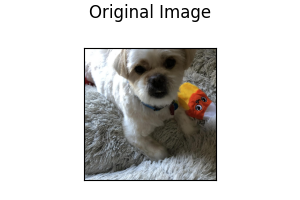
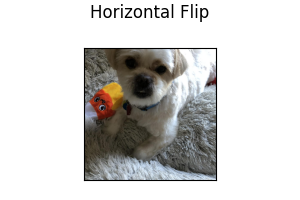
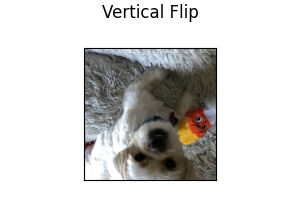
Following illustrates how augmentation affects an image:
Horizontal Flip: Image is randomly flipped horizontally.
type: random_horizontal_flip
Vertical Flip: Image is randomly flipped vertically.
type: random_vertical_flip
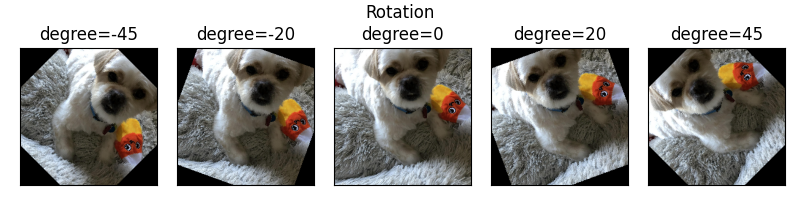
Rotate: Image is randomly rotated by an amount in the range [-degree, +degree]. degree must be a positive integer.
type: random_rotate
degree: 15
Parameters:
degree(default:15): Range of angle for random rotation, i.e., [-degree, +degree].
Following shows the effect of rotating an image:
Blur: Image is randomly blurred using a Gaussian filter with kernel size specified by the user. The kernel_size must be a positive, odd integer.
type: random_blur
kernel_size: 3
Parameters:
kernel_size(default:3): Kernel size for random blur.
Following shows the effect of blurring an image with various kernel sizes:
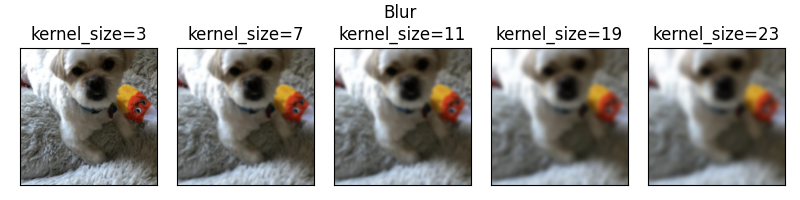
Adjust Brightness: Image brightness is adjusted by a factor randomly selected in the range [min, max]. Both min and max must be a float greater than 0, with min less than max.
type: random_brightness
min: 0.5
max: 2.0
Parameters:
min(default:0.5): Minimum factor for random brightness.max(default:2.0): Maximum factor for random brightness.
Following shows the effect of brightness adjustment with various factors:
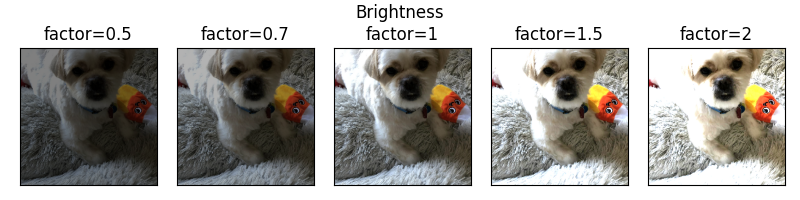
Adjust Contrast: Image contrast is adjusted by a factor randomly selected in the range [min, max]. Both min and max must be a float greater than 0, with min less than max.
type: random_contrast
min: 0.5
max: 2.0
Parameters:
min(default:0.5): Minimum factor for random contrast.max(default:2.0): Maximum factor for random contrast.
Following shows the effect of contrast adjustment with various factors:
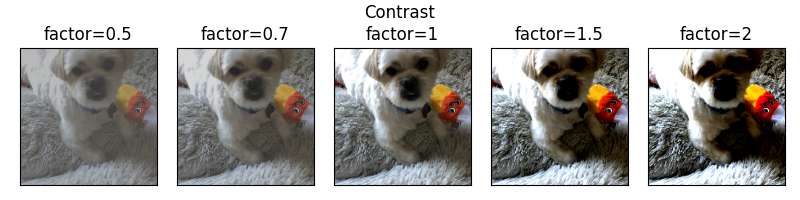
Illustrative Examples of Image Feature Configuration with Augmentation
name: image_column_name
type: image
encoder:
    type: resnet
    model_variant: 18
    use_pretrained: true
    pretrained_cache_dir: None
    trainable: true
augmentation: false
name: image_column_name
type: image
encoder:
    type: stacked_cnn
augmentation: true
name: image_column_name
type: image
encoder:
    type: alexnet
augmentation:
    - type: random_horizontal_flip
    - type: random_rotate
      degree: 10
    - type: random_blur
      kernel_size: 3
    - type: random_brightness
      min: 0.5
      max: 2.0
    - type: random_contrast
      min: 0.5
      max: 2.0
    - type: random_vertical_flip
Output Features
Image features can be used when semantic segmentation needs to be performed.
Ludwig 0.15 exposes three segmentation decoders: unet, segformer, and fpn.
Example image output feature using default parameters:
name: image_column_name
type: image
reduce_input: sum
dependencies: []
reduce_dependencies: sum
loss:
    type: softmax_cross_entropy
decoder:
    type: unet
Parameters:
reduce_input(defaultsum): defines how to reduce an input that is not a vector, but a matrix or a higher order tensor, on the first dimension (second if you count the batch dimension). Available values are:sum,meanoravg,max,concat(concatenates along the first dimension),last(returns the last vector of the first dimension).dependencies(default[]): the output features this one is dependent on. For a detailed explanation refer to Output Feature Dependencies.reduce_dependencies(defaultsum): defines how to reduce the output of a dependent feature that is not a vector, but a matrix or a higher order tensor, on the first dimension (second if you count the batch dimension). Available values are:sum,meanoravg,max,concat(concatenates along the first dimension),last(returns the last vector of the first dimension).loss(default{type: softmax_cross_entropy}): is a dictionary containing a losstype.softmax_cross_entropyis the only supported loss type for image output features. See Loss for details.decoder(default:{"type": "unet"}): Decoder for the desired task. Options:unet,segformer,fpn. See Decoder for details.
Decoders
U-Net Decoder
The U-Net decoder is based on
U-Net: Convolutional Networks for Biomedical Image Segmentation.
The decoder implements the expansive upsampling path of the U-Net stack.
Semantic segmentation supports one input and one output feature. The num_fc_layers in the decoder
and combiner sections must be set to 0 as U-Net does not have any fully connected layers.
U-Net Decoder takes the following optional parameters:
decoder:
    type: unet
    conv_norm: batch
    num_stages: 4
    fc_layers: null
    num_fc_layers: 0
    fc_output_size: 256
    fc_use_bias: true
    fc_weights_initializer: xavier_uniform
    fc_bias_initializer: zeros
    fc_norm: null
    fc_norm_params: null
    fc_activation: relu
    fc_dropout: 0.0
Parameters:
conv_norm(default:batch): This is the default norm that will be used for each double conv layer.It can be null or batch. Options:batch,null.num_stages(default:4): Number of encoder/decoder stage pairs in the UNet. The input image dimensions must be divisible by 2^num_stages. Increasing this value lets the model capture features at more spatial scales.fc_layers(default:null):num_fc_layers(default:0):fc_output_size(default:256):fc_use_bias(default:true):fc_weights_initializer(default:xavier_uniform):fc_bias_initializer(default:zeros):fc_norm(default:null):fc_norm_params(default:null):fc_activation(default:relu):fc_dropout(default:0.0):
The decoder depth is configurable via num_stages (default 4). Each stage doubles the
spatial resolution during upsampling, so the combiner output height and width must be
divisible by 2 ** num_stages. Deeper stacks capture longer-range spatial context at the
cost of more parameters.
SegFormer Decoder
segformer implements the lightweight all-MLP decoder from
Xie et al., NeurIPS 2021. Instead of transposed
convolutions it projects all encoder stages into a shared hidden size and fuses them with a
single MLP — much cheaper than U-Net while remaining competitive on standard segmentation
benchmarks when paired with a pretrained hierarchical encoder such as Swin or ConvNeXt V2.
output_features:
  - name: mask
    type: image
    decoder:
      type: segformer
      hidden_size: 256
      dropout: 0.1
      num_classes: 21
decoder:
    type: segformer
    hidden_size: 256
    dropout: 0.1
    fc_layers: null
    num_fc_layers: 0
    fc_output_size: 256
    fc_use_bias: true
    fc_weights_initializer: xavier_uniform
    fc_bias_initializer: zeros
    fc_norm: null
    fc_norm_params: null
    fc_activation: relu
    fc_dropout: 0.0
Parameters:
hidden_size(default:256): Width of the hidden MLP projection applied to the feature map before upsampling. Larger values increase capacity but also compute cost.dropout(default:0.1): Dropout probability applied after the hidden MLP projection.fc_layers(default:null):num_fc_layers(default:0):fc_output_size(default:256):fc_use_bias(default:true):fc_weights_initializer(default:xavier_uniform):fc_bias_initializer(default:zeros):fc_norm(default:null):fc_norm_params(default:null):fc_activation(default:relu):fc_dropout(default:0.0):
FPN Decoder
fpn implements the Feature Pyramid Network decoder from
Lin et al., CVPR 2017. It builds a top-down pyramid with
lateral connections across multiple encoder stages, producing multi-scale features that are
useful for dense prediction tasks and for segmenting objects at very different scales.
output_features:
  - name: mask
    type: image
    decoder:
      type: fpn
      num_channels: 256
      num_levels: 4
      num_classes: 80
decoder:
    type: fpn
    num_channels: 256
    num_levels: 4
    fc_layers: null
    num_fc_layers: 0
    fc_output_size: 256
    fc_use_bias: true
    fc_weights_initializer: xavier_uniform
    fc_bias_initializer: zeros
    fc_norm: null
    fc_norm_params: null
    fc_activation: relu
    fc_dropout: 0.0
Parameters:
num_channels(default:256): Number of channels in each FPN level after the lateral 1x1 projection. All pyramid levels are projected to this width before the top-down merge.num_levels(default:4): Number of pyramid levels to build in the top-down pathway. More levels capture coarser context; typical range is 2-5.fc_layers(default:null):num_fc_layers(default:0):fc_output_size(default:256):fc_use_bias(default:true):fc_weights_initializer(default:xavier_uniform):fc_bias_initializer(default:zeros):fc_norm(default:null):fc_norm_params(default:null):fc_activation(default:relu):fc_dropout(default:0.0):
Decoder type and decoder parameters can also be defined once and applied to all image output features using the Type-Global Decoder section.
Loss
Softmax Cross Entropy
loss:
    type: softmax_cross_entropy
    class_weights: null
    weight: 1.0
    robust_lambda: 0
    confidence_penalty: 0
    class_similarities: null
    class_similarities_temperature: 0
Parameters:
class_weights(default:null) : Weights to apply to each class in the loss. If not specified, all classes are weighted equally. The value can be a vector of weights, one for each class, that is multiplied to the loss of the datapoints that have that class as ground truth. It is an alternative to oversampling in case of unbalanced class distribution. The ordering of the vector follows the category to integer ID mapping in the JSON metadata file (the<UNK>class needs to be included too). Alternatively, the value can be a dictionary with class strings as keys and weights as values, like{class_a: 0.5, class_b: 0.7, ...}.weight(default:1.0): Weight of the loss.robust_lambda(default:0): Replaces the loss with(1 - robust_lambda) * loss + robust_lambda / cwherecis the number of classes. Useful in case of noisy labels.confidence_penalty(default:0): Penalizes overconfident predictions (low entropy) by adding an additional term that penalizes too confident predictions by adding aa * (max_entropy - entropy) / max_entropyterm to the loss, where a is the value of this parameter. Useful in case of noisy labels.class_similarities(default:null): If notnullit is ac x cmatrix in the form of a list of lists that contains the mutual similarity of classes. It is used ifclass_similarities_temperatureis greater than 0. The ordering of the vector follows the category to integer ID mapping in the JSON metadata file (the<UNK>class needs to be included too).class_similarities_temperature(default:0): The temperature parameter of the softmax that is performed on each row ofclass_similarities. The output of that softmax is used to determine the supervision vector to provide instead of the one hot vector that would be provided otherwise for each datapoint. The intuition behind it is that errors between similar classes are more tolerable than errors between really different classes.
Loss and loss related parameters can also be defined once and applied to all image output features using the Type-Global Loss section.
Metrics
The measures that are calculated every epoch and are available for image features are the accuracy and loss.
You can set either of them as validation_metric in the training section of the configuration if you set the
validation_field to be the name of a category feature.