Large Language Models
Large Language Models (LLMs) are a kind of neural network used for text generation tasks like chatbots, coding assistants, etc. Unlike ECD models, which are primarily designed for predictive tasks, LLMs are a fundamentally generative model type.
The backbone of an LLM (without the language model head used for next token generation) can be used as a text encoder in ECD models when using the auto_transformer encoder. If you wish to use LLMs for predictive tasks like classification and regression, try ECD. For generative tasks, read on!
Example config for fine-tuning LLaMA-2-7b:
model_type: llm
base_model: meta-llama/Llama-2-7b-hf
input_features:
  - name: input
    type: text
output_features:
  - name: response
    type: text
prompt:
  template: |
    [INST] <<SYS>>
    You are a helpful, detailed, and polite artificial
    intelligence assistant. Your answers are clear and
    suitable for a professional environment.
    If context is provided, answer using only the provided
    contextual information.
    <</SYS>>
    {user_message_1} [/INST]
adapter:
  type: lora
quantization:
  bits: 4
trainer:
  type: finetune
  learning_rate: 0.0001
  batch_size: 1
  gradient_accumulation_steps: 8
  epochs: 3
Base Model
The base_model parameter specifies the pretrained large language model to serve
as the foundation of your custom LLM.
Currently, any pretrained HuggingFace Causal LM model from the HuggingFace Hub is supported as a base_model.
Example:
base_model: meta-llama/Llama-2-7b-hf
Attention
Some models on the HuggingFace Hub require executing untrusted code. For security reasons, these models are currently unsupported. If you have interest in using one of these models, please file a GitHub issue with your use case.
You can also pass in a path to a locally saved Hugging Face model instead of loading from Hugging Face directly.
Example:
base_model: path/to/local/model/weights
HuggingFace Access Token
Some base models like Llama-2 require authorization from HuggingFace to download, which in turn requires obtaining a HuggingFace User Access Token.
Once you have obtained permission to download your preferred base model and have a user access token, you only need to ensure that your token is exposes as an environment variable in order for Ludwig to be able to use it:
export HUGGING_FACE_HUB_TOKEN="<api_token>"
ludwig train ...
Features
Input Features
Because of the way LLMs work, they accept exactly one input, which is of type text.
This input can be built up from one or more columns of the input dataset and optional
interspersed static text. The following three examples illustrate the range of possibilities.
Single Dataset Column Only
If it is intended for the input to the LLM to be just the content of a single dataset column (without
any other prefixed or suffixed text), no prompt template should be provided and the name of the
feature must correspond to that specific dataset column. See the following example.
input_features:
  - name: input
    type: text
The value of the name attribute (input in the example) is the name of a
dataset column.
See Text Features for configuration options.
Single Dataset Column with Additional Text
If the input to the LLM must be created by prefixing and/or suffixing some static text
to the content of one dataset column, then a prompt template must be provided to specify how
the content of the chosen column should be formatted for the LLM. See the following example.
prompt:
  template: |
    Translate into French
    Input: {english_input}
    Translation:

input_features:
  - name: prompt
    type: text
In the example above english_input is the name of a column in the input dataset.
In this case the name of the input_feature (prompt) is not the name of a
dataset column (as in the previous example). It is just a placeholder that is replaced
by the formatted text obtained by applying the template to the selected dataset column.
The actual name used has no significance, so you can choose any name that is intuitive
in the context of your application.
Multiple Dataset Columns with Interspersed Static Text
This case is a generalization of the last example to situations that have to process two or more dataset columns. See the example below.
prompt:
  template: |
    [INST] <<SYS>>
    You are a helpful, detailed, and polite AI assistant.
    Answer the question using only the provided context.
    <</SYS>>

    ### Context:
    {context}

    ### Question:
    {question}

    ### Response:
    [/INST]

input_features:
  - name: prompt
    type: text
As in the previous example context and question are names of columns in the input dataset.
The name of the input_feature (prompt here) is again just a placeholder that will be
replaced by formatted text obtained by applying the template to the selected dataset columns.
The name used (prompt) is not significant, so any intuitive name could have been used without
changing the results obtained.
Output Features
Currently, the LLM model type only supports a single output feature.
LLM Text Output Feature
When fine-tuning (trainer.type: finetune), the output feature type must be
text. Even if you are fine-tuning your LLM for a binary or multi-class classification
problem, set the output feature type of that column to text.
For in-context learning or zero shot learning (trainer.type: none), the output
feature type can be one of text or category.
output_features:
  - name: response
    type: text
See Text Output Features for configuration options.
LLM Category Output Feature
In order to use the category output feature type, you must provide two additional specifications. The first additional specification is a set of match values as part of the decoder configuration. These match values are used to determine which category label to assign to the generated response. This is particularly helpful to mitigate against cases where LLM text generation deviates from the desired response format.
The second additional specification is a fallback label in preprocessing.fallback_label. This label is used both for filling in missing values in the output feature column in your dataset, but also for providing a pre-determined value when the LLM is unable to generate a response that matches any of the categories provided.
output_features:
  - name: label
    type: category
    preprocessing:
      fallback_label: "neutral"
    decoder:
      type: category_extractor
      match:
        "negative":
          type: contains
          value: "negative"
        "neutral":
          type: contains
          value: "neutral"
        "positive":
          type: contains
          value: "positive"
Ludwig 0.15 expands category_extractor with two new match strategies and constrained
decoding:
match.<label>.type |
Use for | value |
|---|---|---|
contains |
Simple substring matching | Literal string to look for in the generation |
regex |
Flexible pattern matching | Python regex; the first match selects the label |
json_schema |
LLMs asked to emit structured output | JSON value that must match the parsed JSON response |
decoder:
  type: category_extractor
  match:
    "positive":
      type: regex
      value: "(?i)\\bpositive\\b"
    "negative":
      type: regex
      value: "(?i)\\bnegative\\b"
For json_schema, Ludwig parses the model's response as JSON and compares the resolved
value against value. This is the recommended strategy when the prompt asks the LLM to
return a JSON object.
Constrained decoding
Setting constrain_to_vocabulary: true on category_extractor installs a HuggingFace
LogitsProcessor that masks out any token that cannot lead to a valid label prefix. The
model is then guaranteed to generate one of the configured categories — useful for
zero-shot classification tasks where parsing failures are unacceptable.
output_features:
  - name: label
    type: category
    decoder:
      type: category_extractor
      constrain_to_vocabulary: true
      match:
        "positive":
          type: contains
          value: "positive"
        "negative":
          type: contains
          value: "negative"
Constrained decoding requires a HuggingFace tokenizer (the default for llm models).
Prompt
One of the unique properties of large language models as compared to more conventional deep learning models is their ability to incorporate context inserted into the “prompt” to generate more specific and accurate responses.
The prompt parameter can be used to:
- Provide necessary boilerplate needed to make the LLM respond in the correct way (for example, with a response to a question rather than a continuation of the input sequence).
- Combine multiple columns from a dataset into a single text input feature (see TabLLM).
- Provide additional context to the model that can help it understand the task, or provide restrictions to prevent hallucinations.
To make use of prompting, one of prompt.template or prompt.task must be provided. Otherwise the input feature value is passed into
the LLM as-is. Use template for fine-grained control over every aspect of the prompt, and use task to specify the nature of the
task the LLM is to perform while delegating the exact prompt template to Ludwig's defaults.
Attention
Some models that have already been instruction tuned will have been trained to expect a specific prompt template structure. Unfortunately, this isn't provided in any model metadata, and as such, you may need to dig around or experiment with different prompt templates to find what works best when performing in-context learning.
prompt:
    template: null
    task: null
    retrieval:
        type: null
        index_name: null
        model_name: null
        k: 0
template(default:null) : The template to use for the prompt. Must contain at least one of the columns from the input dataset or__sample__as a variable surrounded in curly brackets {} to indicate where to insert the current feature. Multiple columns can be inserted, e.g.:The {color} {animal} jumped over the {size} {object}, where every term in curly brackets is a column in the dataset. If ataskis specified, then the template must also contain the__task__variable. Ifretrievalis specified, then the template must also contain the__context__variable. If no template is provided, then a default will be used based on the retrieval settings, and a task must be set in the config.task(default:null) : The task to use for the prompt. Required iftemplateis not set.retrieval(default:null):
Retrieval
retrieval:
    type: null
    index_name: null
    model_name: null
    k: 0
type(default:null) : The type of retrieval to use for the prompt. IfNone, then no retrieval is used, and the task is framed as a zero-shot learning problem. If notNone(e.g. either 'random' or 'semantic'), then samples are retrieved from an index of the training set and used to augment the input to the model in a few-shot learning setting.index_name(default:null): The name of the index to use for the prompt. Indices are stored in the ludwig cache by default.model_name(default:null): The model used to generate the embeddings used to retrieve samples to inject in the prompt.k(default:0): The number of samples to retrieve.
Max Sequence Lengths
There are many factors at play when it comes to fine-tuning LLMs efficiently on a single GPU.
One of the most important parameters in your control to keep GPU memory usage in check is the choice of the maximum sequence length.
Ludwig provides 3 primary knobs to control max sequence lengths:
input_feature.preprocessing.max_sequence_lengthon the input example, which includes your prompt.output_feature.preprocessing.max_sequence_lengthon the output example, which does not include your prompt.preprocessing.global_max_sequence_length, which is the maximum length sequence (merged input and output) fed to the LLM's forward pass during training.
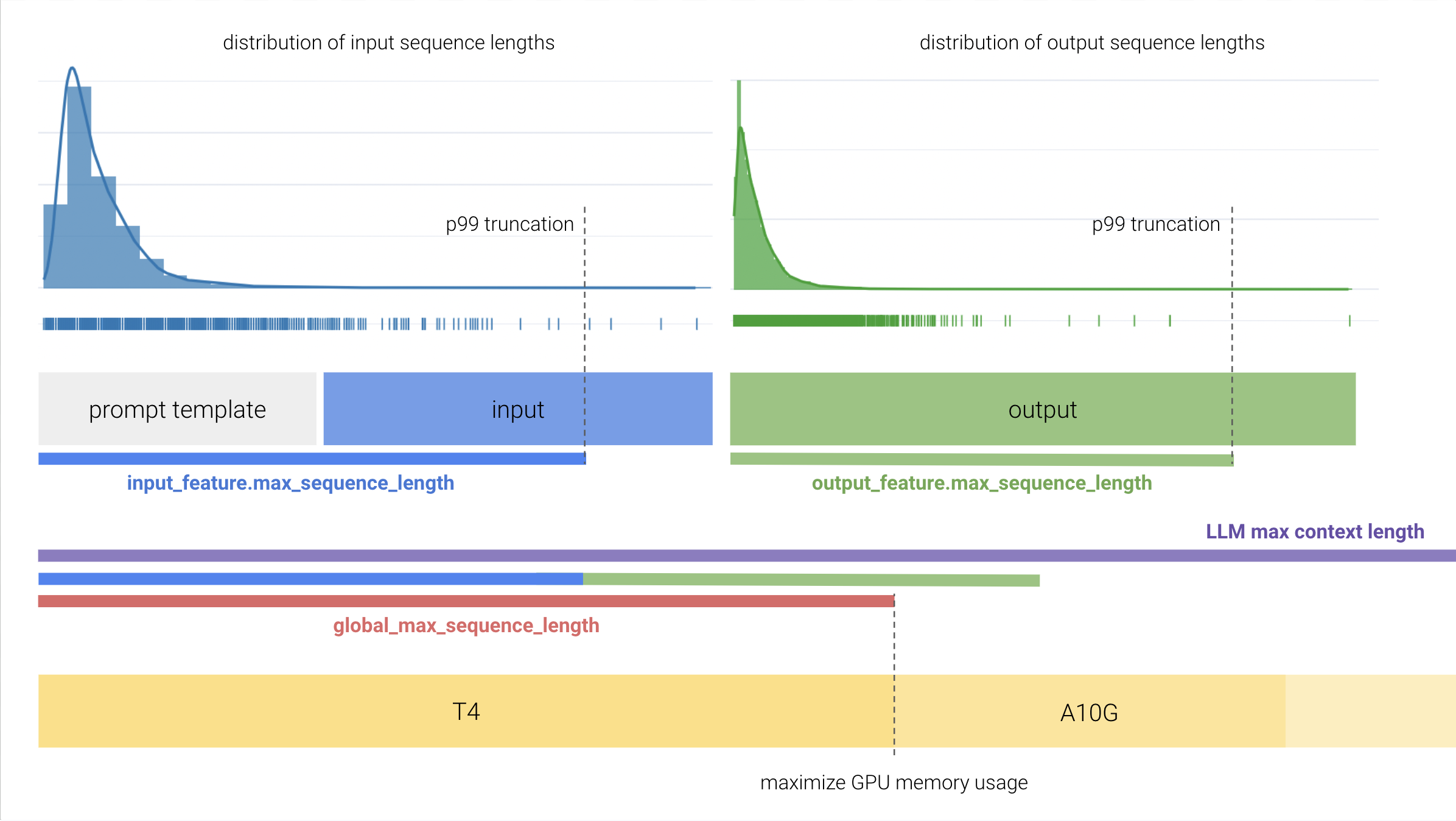
If you are running into GPU OOM issues, consider profiling your dataset to understand the distribution of sequence lengths. For input/output columns with a long tail distribution, it may be worth considering choosing a smaller max sequence length as to truncate a small portion of your data while still training with smaller GPUs.
Adapter
One of the biggest barriers to cost effective fine-tuning for LLMs is the need to update billions of parameters each training step. Parameter efficient fine-tuning (PEFT) adatpers are a collection of techniques that reduce the number of trainable parameters during fine-tuning to speed up training, and decrease the memory and disk space required to train large language models.
PEFT is a popular library from HuggingFace that implements a number of popular parameter efficient fine-tuning strategies. Ludwig provides native integration with PEFT, allowing you to leverage any number of techniques to more efficiently fine-tune LLMs through
the adapter config parameter.
LoRA
LoRA is a simple, yet effective, method for parameter-efficient fine-tuning of pretrained language models. It works by adding a small number of trainable parameters to the model, which are used to adapt the pretrained parameters to the downstream task. This allows the model to be fine-tuned with a much smaller number of training examples, and can even be used to fine-tune models on tasks that have no training data available at all.
adapter:
    type: lora
    r: 8
    dropout: 0.05
    target_modules: null
    use_rslora: false
    use_dora: false
    alpha: 16
    pretrained_adapter_weights: null
    postprocessor:
        merge_adapter_into_base_model: false
        progressbar: false
    bias_type: none
    loraplus_lr_ratio: null
    init_lora_weights: default
    eva_config: null
    loftq_config: null
    rank_pattern: null
    alpha_pattern: null
    layer_replication: null
r(default:8) : Lora attention dimension.dropout(default:0.05): The dropout probability for Lora layers.target_modules(default:null): List of module names or regex expression of the module names to replace with LoRA. For example, ['q', 'v'] or '.decoder.(SelfAttention|EncDecAttention).*(q|v)$'. Defaults to targeting the query and value matrices of all self-attention and encoder-decoder attention layers.use_rslora(default:false): When set to True, uses Rank-Stabilized LoRA which sets the adapter scaling factor to lora_alpha/math.sqrt(r), since it was proven to work better. Otherwise, it will use the original default value of lora_alpha/r. Paper: https://arxiv.org/abs/2312.03732.use_dora(default:false): Enable 'Weight-Decomposed Low-Rank Adaptation' (DoRA). This technique decomposes the updates of the weights into two parts, magnitude and direction. Direction is handled by normal LoRA, whereas the magnitude is handled by a separate learnable parameter. This can improve the performance of LoRA, especially at low ranks. Right now, DoRA only supports non-quantized linear layers. DoRA introduces a bigger overhead than pure LoRA, so it is recommended to merge weights for inference. For more information, see https://arxiv.org/abs/2402.09353alpha(default:null): The alpha parameter for Lora scaling. Defaults to2 * r.pretrained_adapter_weights(default:null):postprocessor(default:null):postprocessor.merge_adapter_into_base_model(default:false): Instructs whether or not the fine-tuned LoRA weights are to be merged into the base LLM model so that the complete fine-tuned model is available to be used and/or persisted, and then reused upon loading as a single model (rather than having to load base and fine-tuned models separately).postprocessor.progressbar(default:false): Instructs whether or not to show a progress bar indicating the unload and merge process.bias_type(default:none): Bias type for Lora. Options:none,all,lora_only.loraplus_lr_ratio(default:null): LoRA+ learning rate ratio (Hayou et al., ICML 2024). When set, the B matrices use lr * loraplus_lr_ratio while A matrices use the base lr. Typical values: 2-16. Provides 1-2%% accuracy gain and up to 2x speedup over standard LoRA. Paper: https://arxiv.org/abs/2402.12354init_lora_weights(default:default): Initialization strategy for LoRA weight matrices. 'default' uses the standard Kaiming uniform init (A) and zeros (B). 'gaussian' uses Gaussian init for A. 'pissa' (Principal Singular values and Singular vectors Adaptation) initializes using SVD of the pretrained weight, converging faster and often outperforming standard LoRA. Paper: https://arxiv.org/abs/2404.02948. 'eva' (Explained Variance Adaptation) initializes from the SVD of layer input activations — requireseva_configto be set. Paper: https://arxiv.org/abs/2410.07170. 'corda' (Context-Oriented Decomposition Adaptation) combines PiSSA and full fine-tuning signals, converging faster than PiSSA. Paper: https://arxiv.org/abs/2406.05223. 'olora' (Orthonormal LoRA) uses QR decomposition for better conditioning. 'loftq' (LoftQ) jointly quantizes base weights and initializes LoRA — requiresloftq_configto be set. Paper: https://arxiv.org/abs/2310.08659. 'orthogonal' uses orthogonal initialization. Options:default,gaussian,eva,olora,pissa,corda,loftq,orthogonal.eva_config(default:null):loftq_config(default:null):rank_pattern(default:null): Per-layer rank overrides as a mapping of layer name (or regex) to rank integer. Overrides the globalrfor matched layers. Useful for LoRA-XS style configurations where different layers benefit from different ranks. Example: {'model.layers.0.self_attn.q_proj': 4, 'model.layers.0.self_attn.v_proj': 2}alpha_pattern(default:null): Per-layer alpha (scaling) overrides as a mapping of layer name (or regex) to float. Overrides the globalalphafor matched layers.layer_replication(default:null): Layer replication configuration as a list of [start, end] index pairs. Enables depth-wise parameter efficiency by sharing LoRA weights across layer ranges. Example: [[0, 4], [2, 5]] creates two overlapping groups.
AdaLoRA
AdaLoRA is an extension of LoRA that allows the model to adapt the pretrained parameters to the downstream task in a task-specific manner. This is done by adding a small number of trainable parameters to the model, which are used to adapt the pretrained parameters to the downstream task. This allows the model to be fine-tuned with a much smaller number of training examples, and can even be used to fine-tune models on tasks that have no training data available at all.
adapter:
    type: adalora
    pretrained_adapter_weights: null
    postprocessor:
        merge_adapter_into_base_model: false
        progressbar: false
    r: 8
    alpha: 16
    dropout: 0.05
    bias_type: none
    target_modules: null
    use_rslora: false
    use_dora: false
    loraplus_lr_ratio: null
    init_lora_weights: default
    eva_config: null
    loftq_config: null
    rank_pattern: null
    alpha_pattern: null
    layer_replication: null
    target_r: 8
    init_r: 12
    tinit: 0
    tfinal: 0
    delta_t: 1
    beta1: 0.85
    beta2: 0.85
    orth_reg_weight: 0.5
    total_step: 10000
pretrained_adapter_weights(default:null):postprocessor(default:null):postprocessor.merge_adapter_into_base_model(default:false): Instructs whether or not the fine-tuned LoRA weights are to be merged into the base LLM model so that the complete fine-tuned model is available to be used and/or persisted, and then reused upon loading as a single model (rather than having to load base and fine-tuned models separately).postprocessor.progressbar(default:false): Instructs whether or not to show a progress bar indicating the unload and merge process.r(default:8):alpha(default:null):dropout(default:0.05):bias_type(default:none):target_modules(default:null):use_rslora(default:false):use_dora(default:false):loraplus_lr_ratio(default:null):init_lora_weights(default:default):eva_config(default:null):loftq_config(default:null):rank_pattern(default:null): The allocated rank for each weight matrix by RankAllocator.alpha_pattern(default:null):layer_replication(default:null):target_r(default:8): Target Lora Matrix Dimension. The target average rank of incremental matrix.init_r(default:12): Initial Lora Matrix Dimension. The initial rank for each incremental matrix.tinit(default:0): The steps of initial fine-tuning warmup.tfinal(default:0): The steps of final fine-tuning warmup.delta_t(default:1): The time internval between two budget allocations. The step interval of rank allocation.beta1(default:0.85): The hyperparameter of EMA for sensitivity smoothing.beta2(default:0.85): The hyperparameter of EMA for undertainty quantification.orth_reg_weight(default:0.5): The coefficient of orthogonality regularization.total_step(default:10000): The total training steps for AdaLoRA rank allocation scheduling. Must be a positive integer (required by peft >= 0.14).
IA3
Infused Adapter by Inhibiting and Amplifying Inner Activations, or IA3,
is a method that adds three learned vectors l_k``,l_v`, andl_ff`, to rescale the keys and values of the self-attention and encoder-decoder attention layers, and the intermediate activation of the position-wise feed-forward network respectively. These learned vectors are the only trainable parameters during fine-tuning, and thus the original weights remain frozen. Dealing with learned vectors (as opposed to learned low-rank updates to a weight matrix like LoRA) keeps the number of trainable parameters much smaller.
adapter:
    type: ia3
    target_modules: null
    feedforward_modules: null
    fan_in_fan_out: false
    modules_to_save: null
    init_ia3_weights: true
    pretrained_adapter_weights: null
    postprocessor:
        merge_adapter_into_base_model: false
        progressbar: false
target_modules(default:null) : The names of the modules to apply (IA)^3 to.feedforward_modules(default:null) : The names of the modules to be treated as feedforward modules, as in the original paper. These modules will have (IA)^3 vectors multiplied to the input, instead of the output. feedforward_modules must be a name or a subset of names present in target_modules.fan_in_fan_out(default:false) : Set this to True if the layer to replace stores weight like (fan_in, fan_out). For example, gpt-2 uses Conv1D which stores weights like (fan_in, fan_out) and hence this should be set to True.modules_to_save(default:null) : List of modules apart from (IA)^3 layers to be set as trainable and saved in the final checkpoint.init_ia3_weights(default:true) : Whether to initialize the vectors in the (IA)^3 layers, defaults to True.pretrained_adapter_weights(default:null):postprocessor(default:null):postprocessor.merge_adapter_into_base_model(default:false): Instructs whether or not the fine-tuned LoRA weights are to be merged into the base LLM model so that the complete fine-tuned model is available to be used and/or persisted, and then reused upon loading as a single model (rather than having to load base and fine-tuned models separately).postprocessor.progressbar(default:false): Instructs whether or not to show a progress bar indicating the unload and merge process.
VeRA
Vector-based Random Matrix Adaptation. Shares frozen random matrices across layers; only small scaling vectors are trained, giving 10× fewer parameters than LoRA at the same rank.
adapter:
    type: vera
    pretrained_adapter_weights: null
    postprocessor:
        merge_adapter_into_base_model: false
        progressbar: false
    r: 256
    target_modules: null
    projection_prng_key: 0
pretrained_adapter_weights(default:null):postprocessor(default:null):postprocessor.merge_adapter_into_base_model(default:false): Instructs whether or not the fine-tuned LoRA weights are to be merged into the base LLM model so that the complete fine-tuned model is available to be used and/or persisted, and then reused upon loading as a single model (rather than having to load base and fine-tuned models separately).postprocessor.progressbar(default:false): Instructs whether or not to show a progress bar indicating the unload and merge process.r(default:256): VeRA rank dimension.target_modules(default:null): List of module names to apply VeRA to.projection_prng_key(default:0): PRNG key for shared random projection matrices.
LoHa
Low-Rank Hadamard Product Adaptation. Uses a Hadamard product of two low-rank matrices to capture more complex weight updates than LoRA at the same rank.
adapter:
    type: loha
    pretrained_adapter_weights: null
    postprocessor:
        merge_adapter_into_base_model: false
        progressbar: false
    r: 8
    alpha: 8
    target_modules: null
pretrained_adapter_weights(default:null):postprocessor(default:null):postprocessor.merge_adapter_into_base_model(default:false): Instructs whether or not the fine-tuned LoRA weights are to be merged into the base LLM model so that the complete fine-tuned model is available to be used and/or persisted, and then reused upon loading as a single model (rather than having to load base and fine-tuned models separately).postprocessor.progressbar(default:false): Instructs whether or not to show a progress bar indicating the unload and merge process.r(default:8): LoHa rank dimension.alpha(default:8): Scaling factor for LoHa.target_modules(default:null): List of module names to apply LoHa to.
LoKr
Low-Rank Kronecker Product Adaptation. Uses Kronecker product decomposition for efficient weight updates with a different inductive bias than LoRA.
adapter:
    type: lokr
    pretrained_adapter_weights: null
    postprocessor:
        merge_adapter_into_base_model: false
        progressbar: false
    r: 8
    alpha: 8
    target_modules: null
pretrained_adapter_weights(default:null):postprocessor(default:null):postprocessor.merge_adapter_into_base_model(default:false): Instructs whether or not the fine-tuned LoRA weights are to be merged into the base LLM model so that the complete fine-tuned model is available to be used and/or persisted, and then reused upon loading as a single model (rather than having to load base and fine-tuned models separately).postprocessor.progressbar(default:false): Instructs whether or not to show a progress bar indicating the unload and merge process.r(default:8): LoKr rank dimension.alpha(default:8): Scaling factor for LoKr.target_modules(default:null): List of module names to apply LoKr to.
FourierFT
Frequency-domain fine-tuning. Learns weight updates in the Fourier frequency domain, providing a complementary inductive bias to spatial methods like LoRA.
adapter:
    type: fourierft
    pretrained_adapter_weights: null
    postprocessor:
        merge_adapter_into_base_model: false
        progressbar: false
    n_frequency: 1000
    scaling: 150.0
    target_modules: null
pretrained_adapter_weights(default:null):postprocessor(default:null):postprocessor.merge_adapter_into_base_model(default:false): Instructs whether or not the fine-tuned LoRA weights are to be merged into the base LLM model so that the complete fine-tuned model is available to be used and/or persisted, and then reused upon loading as a single model (rather than having to load base and fine-tuned models separately).postprocessor.progressbar(default:false): Instructs whether or not to show a progress bar indicating the unload and merge process.n_frequency(default:1000): Number of frequency components.scaling(default:150.0): Scaling factor for FourierFT.target_modules(default:null): List of module names to apply FourierFT to.
BOFT
Butterfly Orthogonal Fine-Tuning. Learns orthogonal transformations via butterfly factorization, preserving the pre-trained model's geometry while adapting to new tasks.
adapter:
    type: boft
    pretrained_adapter_weights: null
    postprocessor:
        merge_adapter_into_base_model: false
        progressbar: false
    boft_block_size: 4
    boft_n_butterfly_factor: 1
    boft_dropout: 0.05
    target_modules: null
pretrained_adapter_weights(default:null):postprocessor(default:null):postprocessor.merge_adapter_into_base_model(default:false): Instructs whether or not the fine-tuned LoRA weights are to be merged into the base LLM model so that the complete fine-tuned model is available to be used and/or persisted, and then reused upon loading as a single model (rather than having to load base and fine-tuned models separately).postprocessor.progressbar(default:false): Instructs whether or not to show a progress bar indicating the unload and merge process.boft_block_size(default:4): Block size for butterfly factorization.boft_n_butterfly_factor(default:1): Number of butterfly factors.boft_dropout(default:0.05): Dropout for BOFT layers.target_modules(default:null): List of module names to apply BOFT to.
TinyLoRA
TinyLoRA: extreme parameter-efficient fine-tuning via SVD projection (LoRA-XS variant).
adapter:
    type: tinylora
    pretrained_adapter_weights: null
    postprocessor:
        merge_adapter_into_base_model: false
        progressbar: false
    r: 2
    u: 64
    weight_tying: 0.0
    projection_seed: 42
    save_projection: true
    tinylora_dropout: 0.0
    target_modules: null
pretrained_adapter_weights(default:null):postprocessor(default:null):postprocessor.merge_adapter_into_base_model(default:false): Instructs whether or not the fine-tuned LoRA weights are to be merged into the base LLM model so that the complete fine-tuned model is available to be used and/or persisted, and then reused upon loading as a single model (rather than having to load base and fine-tuned models separately).postprocessor.progressbar(default:false): Instructs whether or not to show a progress bar indicating the unload and merge process.r(default:2): SVD rank for the frozen U, Sigma, V decomposition. The paper recommends r=2.u(default:64): Trainable vector dimension per group. Controls the expressivity of the adaptation. Can be as low as 1–13 for extreme parameter efficiency.weight_tying(default:0.0): Degree of weight tying across target modules (0.0 = no sharing, 1.0 = full sharing). Sharing trainable vectors across modules further reduces parameter count.projection_seed(default:42): Random seed for generating the fixed projection matrices.save_projection(default:true): Whether to save the projection tensors in the state dict.tinylora_dropout(default:0.0): Dropout probability for TinyLoRA layers.target_modules(default:null): List of module names or regex to apply TinyLoRA to.
C3A
C3A: context-aware block-diagonal adapter for multi-task and compositional fine-tuning.
adapter:
    type: c3a
    pretrained_adapter_weights: null
    postprocessor:
        merge_adapter_into_base_model: false
        progressbar: false
    block_size: 256
    target_modules: null
    bias_type: none
pretrained_adapter_weights(default:null):postprocessor(default:null):postprocessor.merge_adapter_into_base_model(default:false): Instructs whether or not the fine-tuned LoRA weights are to be merged into the base LLM model so that the complete fine-tuned model is available to be used and/or persisted, and then reused upon loading as a single model (rather than having to load base and fine-tuned models separately).postprocessor.progressbar(default:false): Instructs whether or not to show a progress bar indicating the unload and merge process.block_size(default:256): Block size for C3A, must be divisible by both the input size and the output size of each target layer. Setting this to the GCD of all target layer dimensions is a safe default. Larger block sizes mean fewer parameters.target_modules(default:null): List of module names or regex to apply C3A to.bias_type(default:none): Bias type for C3A. 'none' trains no biases; 'all' or 'c3a_only' trains the adapter biases. Options:none,all,c3a_only.
OFT
OFT: Orthogonal Fine-Tuning that preserves hyperspherical energy of the pre-trained model.
adapter:
    type: oft
    pretrained_adapter_weights: null
    postprocessor:
        merge_adapter_into_base_model: false
        progressbar: false
    r: 0
    oft_block_size: 32
    module_dropout: 0.0
    target_modules: null
    coft: false
    eps: 6.0e-05
pretrained_adapter_weights(default:null):postprocessor(default:null):postprocessor.merge_adapter_into_base_model(default:false): Instructs whether or not the fine-tuned LoRA weights are to be merged into the base LLM model so that the complete fine-tuned model is available to be used and/or persisted, and then reused upon loading as a single model (rather than having to load base and fine-tuned models separately).postprocessor.progressbar(default:false): Instructs whether or not to show a progress bar indicating the unload and merge process.r(default:0): OFT rank. When 0, the block size (oft_block_size) controls the granularity instead. Cannot be set simultaneously withoft_block_size.oft_block_size(default:32): Block size for the butterfly factorization of the orthogonal transform.module_dropout(default:0.0): Probability of randomly zeroing an OFT block during training.target_modules(default:null): List of module names or regex to apply OFT to.coft(default:false): Whether to use Constrained OFT (COFT), which enforces the constraint ||I - R^T R||_F <= eps.eps(default:6e-05): Constraint strength for COFT (only used whencoft=True).
HRA
HRA: Householder Reflection Adaptation — orthogonal updates via Householder reflections.
adapter:
    type: hra
    pretrained_adapter_weights: null
    postprocessor:
        merge_adapter_into_base_model: false
        progressbar: false
    r: 8
    apply_GS: false
    target_modules: null
pretrained_adapter_weights(default:null):postprocessor(default:null):postprocessor.merge_adapter_into_base_model(default:false): Instructs whether or not the fine-tuned LoRA weights are to be merged into the base LLM model so that the complete fine-tuned model is available to be used and/or persisted, and then reused upon loading as a single model (rather than having to load base and fine-tuned models separately).postprocessor.progressbar(default:false): Instructs whether or not to show a progress bar indicating the unload and merge process.r(default:8): Number of Householder reflections (rank). More reflections = more expressive adaptation.apply_GS(default:false): Whether to apply Gram-Schmidt orthogonalization to the Householder vectors. Improves numerical stability at the cost of a small overhead.target_modules(default:null): List of module names or regex to apply HRA to.
WaveFT
WaveFT: Wavelet-domain fine-tuning with structured frequency-domain weight updates.
adapter:
    type: waveft
    pretrained_adapter_weights: null
    postprocessor:
        merge_adapter_into_base_model: false
        progressbar: false
    n_frequency: 2592
    scaling: 25.0
    wavelet_family: db1
    target_modules: null
pretrained_adapter_weights(default:null):postprocessor(default:null):postprocessor.merge_adapter_into_base_model(default:false): Instructs whether or not the fine-tuned LoRA weights are to be merged into the base LLM model so that the complete fine-tuned model is available to be used and/or persisted, and then reused upon loading as a single model (rather than having to load base and fine-tuned models separately).postprocessor.progressbar(default:false): Instructs whether or not to show a progress bar indicating the unload and merge process.n_frequency(default:2592): Number of wavelet frequency components to learn. Fewer = more parameter efficient.scaling(default:25.0): Scaling factor applied to the wavelet-domain updates.wavelet_family(default:db1): Wavelet family to use for the discrete wavelet transform. 'db1'/'haar' are simplest; higher-order Daubechies ('db2', 'db3') capture smoother features. Options:db1,db2,db3,haar,sym2,coif1.target_modules(default:null): List of module names or regex to apply WaveFT to.
LN-Tuning
LN-Tuning: tunes only the layer normalization parameters for ultra-lightweight adaptation.
adapter:
    type: ln_tuning
    pretrained_adapter_weights: null
    postprocessor:
        merge_adapter_into_base_model: false
        progressbar: false
    target_modules: null
pretrained_adapter_weights(default:null):postprocessor(default:null):postprocessor.merge_adapter_into_base_model(default:false): Instructs whether or not the fine-tuned LoRA weights are to be merged into the base LLM model so that the complete fine-tuned model is available to be used and/or persisted, and then reused upon loading as a single model (rather than having to load base and fine-tuned models separately).postprocessor.progressbar(default:false): Instructs whether or not to show a progress bar indicating the unload and merge process.target_modules(default:null): List of layer norm module names or regex to tune. Defaults to all LayerNorm / RMSNorm modules in the model.
VBLoRA
VBLoRA: Vector Bank LoRA that shares vectors across layers for extreme compression.
adapter:
    type: vblora
    pretrained_adapter_weights: null
    postprocessor:
        merge_adapter_into_base_model: false
        progressbar: false
    r: 4
    num_vectors: 256
    vector_length: 256
    topk: 2
    vblora_dropout: 0.0
    save_only_topk_weights: false
    target_modules: null
pretrained_adapter_weights(default:null):postprocessor(default:null):postprocessor.merge_adapter_into_base_model(default:false): Instructs whether or not the fine-tuned LoRA weights are to be merged into the base LLM model so that the complete fine-tuned model is available to be used and/or persisted, and then reused upon loading as a single model (rather than having to load base and fine-tuned models separately).postprocessor.progressbar(default:false): Instructs whether or not to show a progress bar indicating the unload and merge process.r(default:4): LoRA rank dimension. Controls the bottleneck size of each adaptation.num_vectors(default:256): Number of vectors in the global vector bank shared across all layers.vector_length(default:256): Length (dimension) of each vector in the bank. Usually set to the hidden size or head dim.topk(default:2): Number of top-k vectors selected from the bank for each LoRA matrix column. Higher k increases expressivity but also parameter count.vblora_dropout(default:0.0): Dropout probability for VBLoRA layers.save_only_topk_weights(default:false): Whether to save only the top-k selection logits rather than the full bank weights.target_modules(default:null): List of module names or regex to apply VBLoRA to.
Advanced LoRA initializers
By default LoRA initializes A randomly (Kaiming uniform) and B to zero so that the adapter starts as a
no-op. PR #4146 adds four alternative initializers that can dramatically improve convergence speed and final
quality, especially at low rank.
Set them via the init_lora_weights field on the lora adapter:
adapter:
  type: lora
  r: 16
  alpha: 32
  init_lora_weights: pissa   # pissa | eva | corda | loftq | true (default)
PiSSA (init_lora_weights: pissa)
Principal Singular Values and Singular Vectors Adaptation. Initializes A and B from the top-r
singular components of the weight matrix W. The residual W - AB is kept frozen. This aligns the
trainable subspace with the directions of greatest variance in the pretrained weights and consistently
outperforms standard LoRA at the same rank.
adapter:
  type: lora
  r: 16
  alpha: 16
  init_lora_weights: pissa
EVA (init_lora_weights: eva)
Explained Variance Adaptation. Data-driven initialization that selects the rank-r subspace that
explains the most variance across a small calibration batch. Requires an eva_config sub-config.
adapter:
  type: lora
  r: 8
  alpha: 8
  init_lora_weights: eva
  eva_config:
    n_samples: 128    # calibration samples used to compute the subspace
CorDA (init_lora_weights: corda)
Correlation-Driven LoRA Adaptation. Initializes the adapter using activation correlations to align the low-rank subspace with the most task-relevant directions. Like EVA, this is a data-driven approach that works well when a small in-domain calibration set is available.
adapter:
  type: lora
  r: 16
  alpha: 16
  init_lora_weights: corda
LoftQ (init_lora_weights: loftq)
LoRA-Fine-Tuning-aware Quantization. Jointly optimizes the quantized backbone and the LoRA initialization
so that the quantization error is minimized from the start. Particularly useful when combining 4-bit
quantization with LoRA (QLoRA). Requires a loftq_config sub-config.
adapter:
  type: lora
  r: 16
  alpha: 16
  init_lora_weights: loftq
  loftq_config:
    loftq_bits: 4       # quantization bits (4 or 8)
    loftq_iter: 1       # number of alternating optimization iterations
quantization:
  bits: 4
Per-module rank and alpha overrides
rank_pattern and alpha_pattern allow different modules to use different ranks or scaling factors without
needing separate adapter configs:
adapter:
  type: lora
  r: 8
  alpha: 16
  rank_pattern:
    q_proj: 16     # higher rank for query projection
    v_proj: 16     # higher rank for value projection
  alpha_pattern:
    q_proj: 32
    v_proj: 32
Keys are matched by substring against the module names in the model. Modules that do not match any key use
the top-level r and alpha values.
Layer replication
layer_replication instructs PEFT to duplicate specific layers of the backbone before attaching adapters.
This is a cheap way to increase model capacity without adding many parameters:
adapter:
  type: lora
  r: 8
  layer_replication:
    - [0, 4]    # replicate layers 0–3 (exclusive end)
    - [2, 5]    # replicate layers 2–4
New adapter types (PR #4146)
In addition to LoRA, Ludwig supports the following adapter types introduced in PR #4146.
TinyLoRA (type: tinylora)
A compact variant of LoRA that performs a learned rank search across layers, allocating rank budget where it matters most. Useful when parameter count is the binding constraint.
adapter:
  type: tinylora
  r: 8
  alpha: 16
Orthogonal Fine-Tuning (type: oft)
OFT constrains weight updates to orthogonal transformations, preserving the hyperspherical geometry of the pretrained weight space. This maintains the relative angles between activation vectors and is particularly effective for tasks where the pretrained model's geometric structure is important (e.g. image generation, semantic consistency tasks).
adapter:
  type: oft
  r: 8
  module_dropout: 0.0
Householder Reflection Adaptation (type: hra)
HRA parameterizes updates as a product of Householder reflections, which are inherently orthogonal. Fewer parameters than OFT for the same effective rank, at the cost of slightly less expressiveness.
adapter:
  type: hra
  r: 8
WaveFT (type: waveft)
WaveFT applies updates in the wavelet domain, concentrating parameter budget on the frequency components most affected by fine-tuning. Works well on vision and audio features where frequency structure is meaningful.
adapter:
  type: waveft
  r: 8
  alpha: 16
Layer Normalization Tuning (type: ln_tuning)
Trains only the weight and bias parameters of LayerNorm (and RMSNorm) layers while freezing everything
else. Extremely lightweight — typically fewer than 0.1% of backbone parameters — yet surprisingly effective
for domain adaptation of instruction-tuned models.
adapter:
  type: ln_tuning
No rank or alpha parameters are needed; the trainable set is determined entirely by the LayerNorm layers present in the model.
Vector-Bank LoRA (type: vblora)
VBLoRA replaces the per-layer B matrix with a shared global vector bank. Each layer selects and linearly
combines vectors from the bank, reducing total parameter count when many layers share similar update
directions.
adapter:
  type: vblora
  r: 4
  num_vectors: 256    # size of the shared vector bank
  vector_length: 256  # dimension of each bank vector
C3A (type: c3a)
Block-sparse adapter with a configurable block size. Each block of weights is updated with a small dense matrix, concentrating capacity where it is most needed while keeping the overall parameter count low.
adapter:
  type: c3a
  r: 8
  block_size: 4   # size of the dense update blocks
Quantization
Quantization allows you to load model parameters, which are typically stored as 16 or 32 bit floating-points, as 4 bit or 8 bit integers. This allows you to reduce the GPU memory overhead by a factor of up to 8x.
When combined with the LoRA adapter, you can perform quantized fine-tuning as described in the paper QLoRA. For context, this enables training large language models as big as 7 billion parameters on a single commodity GPU with minimal performance penalties.
Attention
Quantized fine-tuning currently requires using adapter: lora. In-context
learning does not have this restriction.
Attention
Quantization is currently only supported with backend: local.
quantization:
    bits: 4
    backend: bitsandbytes
    mode: null
    qat: false
    llm_int8_threshold: 6.0
    llm_int8_has_fp16_weight: false
    bnb_4bit_compute_dtype: float16
    bnb_4bit_use_double_quant: true
    bnb_4bit_quant_type: nf4
bits(default:4) : The quantization level to apply to weights on load. Options:4,8.backend(default:bitsandbytes): Quantization backend. 'bitsandbytes' (default) applies 4-bit / 8-bit quantization at model load time via the bitsandbytes library — the existing QLoRA fine-tuning path. 'torchao' applies PyTorch-native quantization via torchao after model load, and can additionally run quantization-aware training (QAT) whenqat: trueis set. Options:bitsandbytes,torchao.mode(default:null): torchao-only quantization mode. Ignored whenbackendis 'bitsandbytes'. 'int4_weight_only' and 'int8_weight_only' quantize only the weight matrices (activations stay in fp16/bf16). 'int8_dynamic' quantizes activations to int8 dynamically per-forward. 'float8' stores weights in fp8 (useful on H100+). Options:int4_weight_only,int8_weight_only,int8_dynamic,float8,null.qat(default:false): torchao-only. When true, inserts fake-quant observers into the model before training (QAT). The model is trained in the target low-precision numerical regime, then converted to actually-quantized weights at save time. Ignored whenbackendis 'bitsandbytes'.llm_int8_threshold(default:6.0): This corresponds to the outlier threshold for outlier detection as described inLLM.int8() : 8-bit Matrix Multiplication for Transformers at Scalepaper: https://arxiv.org/abs/2208.07339. Any hidden states value that is above this threshold will be considered an outlier and the operation on those values will be done in fp16. Values are usually normally distributed, that is, most values are in the range [-3.5, 3.5], but there are some exceptional systematic outliers that are very differently distributed for large models. These outliers are often in the interval [-60, -6] or [6, 60]. Int8 quantization works well for values of magnitude ~5, but beyond that, there is a significant performance penalty. A good default threshold is 6, but a lower threshold might be needed for more unstable models (small models, fine-tuning).llm_int8_has_fp16_weight(default:false): This flag runs LLM.int8() with 16-bit main weights. This is useful for fine-tuning as the weights do not have to be converted back and forth for the backward pass.bnb_4bit_compute_dtype(default:float16): This sets the computational type which might be different than the input type. For example, inputs might be fp32, but computation can be set to bf16 for speedups. Options:float32,float16,bfloat16.bnb_4bit_use_double_quant(default:true): This flag is used for nested quantization where the quantization constants from the first quantization are quantized again.bnb_4bit_quant_type(default:nf4): This sets the quantization data type in the bnb.nn.Linear4Bit layers. Options:fp4,nf4.
torchao quantization
Ludwig 0.15 adds a second quantization backend — torchao — that uses PyTorch-native kernels instead of bitsandbytes. torchao quantization supports four modes and also enables Quantization-Aware Training (QAT).
quantization:
  backend: torchao
  mode: int4_weight_only   # int4_weight_only | int8_weight_only | int8_dynamic | float8
  qat: false               # set true to enable QAT
Supported modes:
mode |
Description |
|---|---|
int4_weight_only |
4-bit weight-only quantization (activations stay in fp16/bf16) |
int8_weight_only |
8-bit weight-only quantization |
int8_dynamic |
8-bit dynamic per-forward-pass activation quantization |
float8 |
fp8 storage — best on H100+ hardware |
Quantization-Aware Training (QAT)
Setting qat: true inserts fake-quantization observers into the model before training. The
model trains in the target low-precision numerical regime and is converted to actually-quantized
weights at save time. This usually recovers 1–2 perplexity points versus post-training
quantization (PTQ) for aggressive quantization levels like 4-bit.
quantization:
  backend: torchao
  mode: int4_weight_only
  qat: true
adapter:
  type: lora
trainer:
  type: finetune
  epochs: 3
Note
QAT requires backend: torchao. The bitsandbytes backend does not support QAT.
Multi-Adapter PEFT
Ludwig 0.15 adds support for training and deploying multiple named PEFT adapters on the same base
model. Use the adapters: config field (note the plural form) instead of the singular adapter:.
model_type: llm
base_model: meta-llama/Llama-3.1-8B

adapters:
  adapters:
    task_a:
      type: lora
      r: 8
      alpha: 16
    task_b:
      type: lora
      r: 16
      alpha: 32
  active: task_a  # which adapter is active at inference time
adapter: and adapters: are mutually exclusive — use one or the other. Existing configs
that use adapter: continue to work without changes.
Merging adapters
After training, multiple adapters can be merged into a single adapter using PEFT's
add_weighted_adapter() via the adapters.merge: section:
adapters:
  adapters:
    task_a:
      type: lora
      r: 8
    task_b:
      type: lora
      r: 8
  merge:
    name: merged
    sources: [task_a, task_b]
    weights: [0.5, 0.5]
    combination_type: ties  # linear | svd | ties | dare_linear | dare_ties | magnitude_prune
    density: 0.7
  active: merged
Combination types:
combination_type |
Description |
|---|---|
linear |
Plain weighted sum of weight deltas |
svd |
SVD-based merge |
ties |
Resolves sign conflicts before merging (Yadav et al., NeurIPS 2023) |
dare_linear |
DARE sparse pruning + linear merge (Yu et al., ICML 2024) |
dare_ties |
DARE sparse pruning + TIES merge |
magnitude_prune |
Prunes by delta magnitude before merging |
Model Parameters
The model parameters section is used to customized LLM model parameters during model initialization.
Currently, the only supported initialization parameter is rope_scaling.
# Defaults
model_parameters:
  rope_scaling: {}
  neftune_noise_alpha: 0
RoPE Scaling
Large language models like LLaMA-2 face a limitation in the length of context they can consider, which impacts their capacity to comprehend intricate queries or chat-style discussions spanning multiple paragraphs. For instance, LlaMA-2's context is capped at 4096 tokens, or roughly 3000 English words. This renders the model ineffective for tasks involving lengthy documents that surpass this context length.
RoPE Scaling presents a way to increase the context length of your model at the cost of a slight performance penalty using a method called Position Interpolation. You can read more about it in the original paper here.
There are two parameters to consider for RoPE scaling: type and factor. The typical rule of thumb is that
your new context length will be context_length * factor. So, if you want to extend LLaMA-2 to have a context
length of ~ 16K tokens, you would set the factor to 4.0. The type attribute supports linear interpolation
and dynamic interpolation. Typically, dynamic interpolation has the best performance over larger context lengths
while maintaining low perplexity.
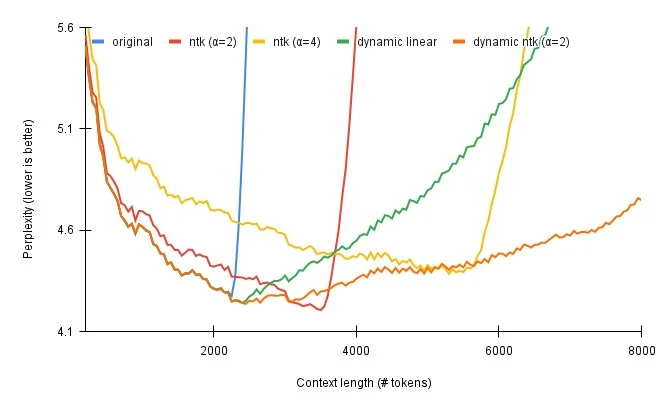 Credit to /u/emozilla and /u/kaiokendev on Reddit for their work and this graphic.
You can enable RoPE Scaling in Ludwig using the following config:
rope_scaling:
    rope_type: dynamic
    factor: 2.0
rope_type(default:null): Currently supports two strategies: linear and dynamic scaling. Options:linear,dynamic,null.factor(default:null): The scaling factor for RoPE embeddings.
Attention
Typically, you need to fine-tune your LLM for about 1000 steps with RoPE scaling enabled to ensure that the performance drop with RoPE scaling is minimal and the model adapts your data to the new RoPE embeddings.
Neftune Noise Alpha
NEFTune is a technique to boost the performance of models during fine-tuning. NEFTune adds noise to the embedding vectors during training. The alpha parameter serves as a control mechanism, allowing users to regulate the intensity of noise introduced to embeddings. A higher alpha value corresponds to a greater amount of noise, impacting the embedding vectors during the fine-tuning phase.
Standard finetuning of LLaMA-2-7B using Alpaca achieves 29.79% on AlpacaEval, which rises to 64.69% using noisy embeddings. NEFTune also improves over strong baselines on modern instruction datasets. You can find more information in the paper titled "NEFTune: Noisy Embeddings Improve Instruction Finetuning".
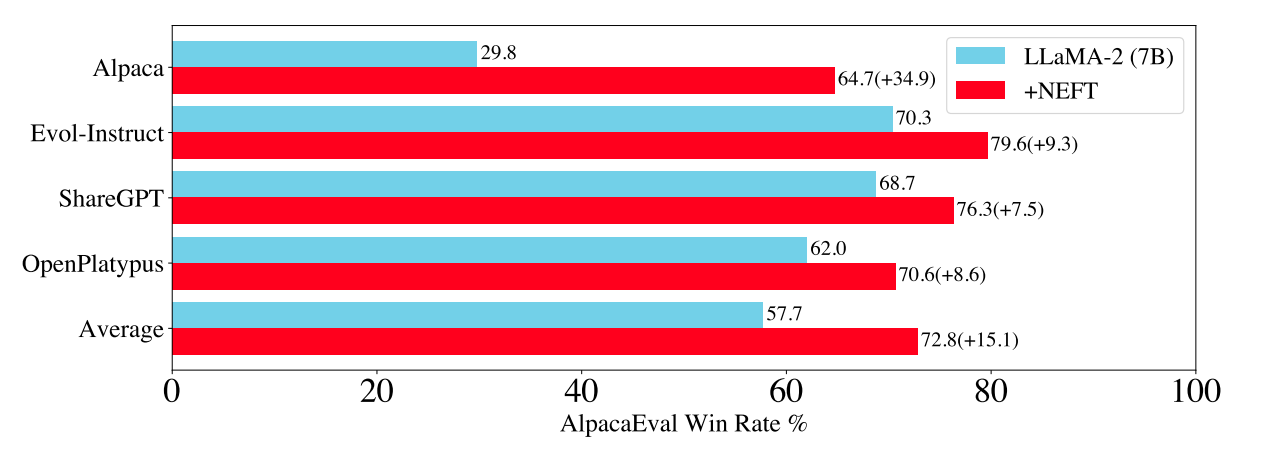
You can enable NEFTune in Ludwig using the following config:
model_parameters:
  neftune_noise_alpha: 5
Trainer
LLMs support multiple different training objectives:
- Fine-Tuning (
type: finetune): update the weights of a pretrained LLM with supervised learning. - In-Context Learning (
type: none): evaluate model performance and predict using only context provided in the prompt.
Fine-Tuning
For fine-tuning, see the Trainer section for configuration options.
trainer:
  type: finetune
In-Context Learning
For in-context learning, the none trainer is specified to denote that no
model parameters will be updated and the "training" step will essentially be
a no-op, except for the purpose of computing metrics on the test set.
trainer:
  type: none
Generation
When generating text during inference using a pretrained or fine-tuned LLM, you may
often want to control the generation process, such as what token decoding strategy to use,
how many new tokens to produce, which tokens to exclude, or how diverse you want the generated
text to be. All of these can be controlled through the generation config in Ludwig.
While Ludwig sets predefined default values for most of these parameters, some of the most useful parameters to control the generation process are:
max_new_tokenstemperaturedo_samplenum_beamstop_ktop_p
Check out the description for these parameters below!
generation:
    max_new_tokens: 32
    temperature: 0.1
    min_new_tokens: null
    max_length: 32
    min_length: 0
    do_sample: true
    num_beams: 1
    use_cache: true
    prompt_lookup_num_tokens: null
    top_k: 50
    top_p: 1.0
    early_stopping: false
    max_time: null
    num_beam_groups: 1
    penalty_alpha: null
    typical_p: 1.0
    epsilon_cutoff: 0.0
    eta_cutoff: 0.0
    diversity_penalty: 0.0
    repetition_penalty: 1.0
    encoder_repetition_penalty: 1.0
    length_penalty: 1.0
    no_repeat_ngram_size: 0
    bad_words_ids: null
    force_words_ids: null
    renormalize_logits: false
    forced_bos_token_id: null
    forced_eos_token_id: null
    remove_invalid_values: false
    exponential_decay_length_penalty: null
    suppress_tokens: null
    begin_suppress_tokens: null
    forced_decoder_ids: null
    sequence_bias: null
    guidance_scale: null
    pad_token_id: null
    bos_token_id: null
    eos_token_id: null
max_new_tokens(default:32) : The maximum number of new tokens to generate, ignoring the number of tokens in the input prompt. If not set, this is dynamically determined by Ludwig based on either themax_sequence_lengthof the ouput feature, the global_max_sequence_length specified in preprocessing (if specified), or the maximum context length supported by the model (in the order specified).temperature(default:0.1) : Temperature is used to control the randomness of predictions. A high temperature value (closer to 1) makes the output more diverse and random, while a lower temperature (closer to 0) makes the model's responses more deterministic and focused on the most likely outcome. In other words, temperature adjusts the probability distribution from which the model picks the next token.min_new_tokens(default:null): The minimum number of new tokens to generate, ignoring the number of tokens in the input prompt.max_length(default:32): The maximum length the generated tokens can have. Corresponds to the length of the input prompt + max_new_tokens. Its effect is overridden by max_new_tokens, if also set.min_length(default:0): The minimum length of the sequence to be generated. Corresponds to the length of the input prompt + min_new_tokens. Its effect is overridden by min_new_tokens, if also set.do_sample(default:true): Whether or not to use sampling ; use greedy decoding otherwise.num_beams(default:1): Number of beams for beam search. 1 means no beam search and is the default value. The beam search strategy generates the translation word by word from left-to-right while keeping a fixed number (beam) of active candidates at each time step during token generation. By increasing the beam size, the translation performance can increase at the expense of significantly reducing the decoder speed.use_cache(default:true): Whether or not the model should use the past last key/values attentions (if applicable to the model) to speed up decoding.prompt_lookup_num_tokens(default:null): The number of tokens to consider as a candidate from the prompt for prompt lookup decoding, an alternate way of performing assisted generation. If set to 0, the prompt lookup decoding is not used.top_k(default:50): The number of highest probability vocabulary tokens to keep for top-k-filtering.top_p(default:1.0): If set to float < 1, only the most probable tokens with probabilities that add up to top_p or higher are kept for generation.early_stopping(default:false): Controls the stopping condition for beam-based methods, like beam-search. It accepts the following values: True, where the generation stops as soon as there are num_beams complete candidates; False, where an heuristic is applied and the generation stops when is it very unlikely to find better candidates;never, where the beam search procedure only stops when there cannot be better candidates (canonical beam search algorithm)max_time(default:null): The maximum amount of time you allow the computation to run for in seconds. generation will still finish the current pass after allocated time has been passed.num_beam_groups(default:1): Number of groups to divide num_beams into in order to ensure diversity among different groups of beams. 1 means no group beam search.penalty_alpha(default:null): The values balance the model confidence and the degeneration penalty in contrastive search decoding.typical_p(default:1.0): Local typicality measures how similar the conditional probability of predicting a target token next is to the expected conditional probability of predicting a random token next, given the partial text already generated. If set to float < 1, the smallest set of the most locally typical tokens with probabilities that add up to typical_p or higher are kept for generation.epsilon_cutoff(default:0.0): If set to float strictly between 0 and 1, only tokens with a conditional probability greater than epsilon_cutoff will be sampled. In the paper, suggested values range from 3e-4 to 9e-4, depending on the size of the model.eta_cutoff(default:0.0): Eta sampling is a hybrid of locally typical sampling and epsilon sampling. If set to float strictly between 0 and 1, a token is only considered if it is greater than either eta_cutoff or sqrt(eta_cutoff) * exp(-entropy(softmax(next_token_logits))). The latter term is intuitively the expected next token probability, scaled by sqrt(eta_cutoff). In the paper, suggested values range from 3e-4 to 2e-3, depending on the size of the model.diversity_penalty(default:0.0): The value used to control the diversity of the generated text. The higher the value, the more diverse the text will be. If set to 0, no diversity is enforced.This value is subtracted from a beam(s) score if it generates a token same as any beam from other group at aparticular time. Note that diversity_penalty is only effective if group beam search is enabled.repetition_penalty(default:1.0): The parameter for repetition penalty. 1.0 means no penalty. See this paper for more details.encoder_repetition_penalty(default:1.0): The paramater for encoder_repetition_penalty. An exponential penalty on sequences that are not in the original input. 1.0 means no penalty.length_penalty(default:1.0): Exponential penalty to the length that is used with beam-based generation. It is applied as an exponent to the sequence length, which in turn is used to divide the score of the sequence. Since the score is the log likelihood of the sequence (i.e. negative), length_penalty > 0.0 promotes longer sequences, while length_penalty < 0.0 encourages shorter sequences.no_repeat_ngram_size(default:0): If set to int > 0, all ngrams of that size can only occur once.bad_words_ids(default:null): List of token ids that are not allowed to be generated. In order to get the tokens of the words that should not appear in the generated text, use tokenizer(bad_word, add_prefix_space=True).input_ids.force_words_ids(default:null): List of token ids that are forced to be generated by the model. In order to get the tokens of the words that should appear in the generated text, use tokenizer(force_word, add_prefix_space=True).input_ids.renormalize_logits(default:false): Whether to renormalize the logits after temperature and top_k/top_p filtering.forced_bos_token_id(default:null): The id of the token to force as the first generated token after the decoder_start_token_id.Useful for multilingual models like mBART where the first generated token needs to be the target languagetoken.forced_eos_token_id(default:null): The id of the token to force as the last generated token when max_length is reached. Optionally, use a list to set multiple end-of-sequence tokens.remove_invalid_values(default:false): Whether to remove possible nan and inf outputs of the model to prevent the generation method to crash. Note that using remove_invalid_values can slow down generation.exponential_decay_length_penalty(default:null): This Tuple adds an exponentially increasing length penalty, after a certain amount of tokens have been generated. The tuple shall consist of: (start_index, decay_factor) where start_index indicates where penalty starts and decay_factor represents the factor of exponential decaysuppress_tokens(default:null): A list of tokens that will be suppressed at generation. The SupressTokens logit processor will set their log probs to -inf so that they are not sampled.begin_suppress_tokens(default:null): A list of tokens that will be suppressed at the beginning of the generation. The SupressBeginTokens logit processor will set their log probs to -inf so that they are not sampled.forced_decoder_ids(default:null): A list of forced decoder ids. The ForcedDecoderIds logit processor will set the log probs of all tokens that are not in the list to -inf so that they are not sampled.sequence_bias(default:null): A dictionary of token ids to bias the generation towards. The SequenceBias logit processor will add the bias to the log probs of the tokens in the dictionary. Positive biases increase the odds of the sequence being selected, while negative biases do the opposite.guidance_scale(default:null): The guidance scale for classifier free guidance (CFG). CFG is enabled by setting guidance_scale > 1. Higher guidance scale encourages the model to generate samples that are more closely linked to the input prompt, usually at the expense of poorer quality.pad_token_id(default:null): The id of the padding token. If not set, the padding token id of the tokenizer is used.bos_token_id(default:null): The id of the beginning of sentence token. If not set, the bos token id of the tokenizer is used.eos_token_id(default:null): The id of the end of sentence token. If not set, the eos token id of the tokenizer is used.
Generation Strategies
Text generation can be performed in a variety of ways for inference. Broadly, there are 5 strategies:
- Greedy Decoding (default): Greedy search is the simplest decoding method. It selects the word with the highest probability as its next word at each time step
t. - Beam Search: Beam search reduces the risk of missing hidden high probability word sequences by keeping the most likely
num_beamsof hypotheses at each time steptand eventually choosing the hypothesis that has the overall highest probability. - Sampling: Sampling means randomly picking the next word according to its conditional probability distribution. Language generation using sampling is not deterministic.
- Top-k Sampling: In Top-k sampling, the
kmost likely next words are filtered and the probability mass is redistributed among only thoseknext words. - Top-p (nucleus) sampling: Instead of sampling only from the most likely K words, Top-p sampling chooses from the smallest possible set of words whose cumulative probability exceeds the probability
p. The probability mass is then redistributed among this set of words. This way, the size of the set of words (a.k.a the number of words in the set) can dynamically increase and decrease according to the next word's probability distribution.
If you want to enable a decoding strategy other than greedy decoding, you can set the following parameters in the generation config to enable them.
- Greedy Decoding (default):
generation:
  num_beams: 1
  do_sample: false
- Multinomial Sampling:
generation:
  num_beams: 1
  do_sample: true
- Beam-Search Decoding:
generation:
  num_beams: 2 # Must be > 1
  do_sample: false
- Contrastive Search:
generation:
  penalty_alpha: 0.1 # Must be > 0
  top_k: 2 # Must be > 1
- Beam-Search Multinomial Sampling:
generation:
  num_beams: 2 # Must be > 1
  do_sample: true
- Diverse Beam-Search Decoding:
generation:
  num_beams: 2 # Must be > 1
  num_beam_groups: 2 # Must be > 1
To read more about how these decoding strategies work in a visual manner, check out this excellent blogpost by HuggingFace.
Post Fine-Tuning
Uploading Fine-Tuned LLM weights to HuggingFace Hub
Once you've fine-tuned your model, you can upload your fine-tuned model artifacts straight to HuggingFace Hub, either in a public model repository that anyone can access, or to a private repository. This works for both artifacts produced during full fine-tuning, as well as adapter based fine-tuning. From there, you can pull the weights straight into a downstream inference service, or even use it directly through Ludwig for inference.
ludwig upload hf_hub --repo_id <repo_id> --model_path </path/to/saved/model>
To learn more on how to do this, click here.